The game loads when you press Play · press “Play Now” inside the game if it asks.
GameTap, Cup Noodles, and Bitter Tears
GameTap, Cup Noodles, and Bitter Tears
GameTap, Cup Noodles, and Bitter Tears: 32X Action
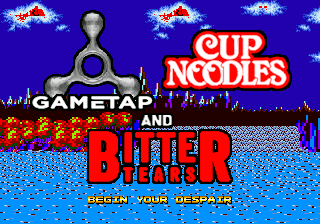
GameTap, Cup Noodles, and Bitter Tears is a homebrew title for the SEGA 32X that appears to have been released only as a ROM file online. Its exact origin and creator are not widely documented. The game's name suggests a humorous or experimental tone, fitting for a fan-made project on this short-lived 32-bit add-on.
The core gameplay of GameTap, Cup Noodles, and Bitter Tears is not concretely described in available sources. Based on the title, it might involve simple interactive elements or a short narrative scenario. Without verified gameplay details, players should approach it with curiosity and an expectation of an unconventional, likely brief experience.
For retro gamers interested in the obscure corners of the 32X library, this title offers a glimpse into what homebrew creators attempted on the platform. It stands as a niche curiosity rather than a polished commercial product. Give it a try if you enjoy exploring unreleased or fan-made games from the 32X era, but keep expectations modest.
GAME INFO
How to play GameTap, Cup Noodles, and Bitter Tears online
When you first load GameTap, Cup Noodles, and Bitter Tears in an emulator, you'll be greeted by a title screen. Since it's a homebrew title, there may be no in-game instructions. The game is likely controlled using the standard 32X button layout mapped to your keyboard.
The specific objective is unclear from available information. Try pressing buttons to interact with the environment or advance any text. If the game is in English (likely for a homebrew), menus should be straightforward. Experiment with different actions to discover what the game expects.
Homebrew titles sometimes have hidden or unpolished mechanics. If you get stuck, consider that the game might be very short or experimental. The emulator's save state feature can be helpful for preserving progress if the game lacks a built-in save system.
CONTROLS
Controls
- Arrow Keys: D-Pad / Movement
- X: A button
- S: B button
- Z: C button
- A: X button (6-button pad)
- Q: Y button (6-button pad)
- E: Z button (6-button pad)
- Enter: Start / Mode
GameTap, Cup Noodles, and Bitter Tears FAQ
Who developed GameTap, Cup Noodles, and Bitter Tears?
The developer of GameTap, Cup Noodles, and Bitter Tears is not widely documented. It seems to have been created by an independent enthusiast or a small team as a homebrew project.
Can players save progress in GameTap, Cup Noodles, and Bitter Tears?
There is no confirmed built-in save system in GameTap, Cup Noodles, and Bitter Tears. Emulator save states are the most reliable way to preserve your progress.
Which regions was GameTap, Cup Noodles, and Bitter Tears released in?
GameTap, Cup Noodles, and Bitter Tears was not commercially released in any region. It exists only as a ROM file distributed online, so it has no official regional launch.








COMMENTS (0)
No comments yet. Be the first to share your thoughts.