The game loads when you press Play · press “Play Now” inside the game if it asks.
Cyber Brawl ~ Cosmic Carnage (Japan, USA)
Cyber Brawl ~ Cosmic Carnage
Cyber Brawl ~ Cosmic Carnage - Fighting Classic
GAME INFO
How to play Cyber Brawl ~ Cosmic Carnage online
Getting Started
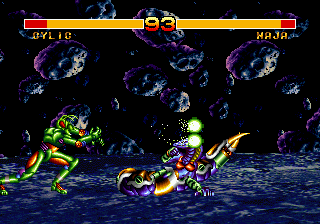
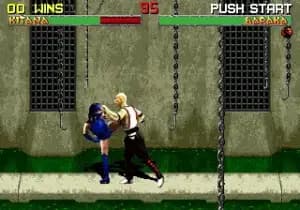
When you boot up Cyber Brawl / Cosmic Carnage, you'll see a simple title screen. Press Start to reach the character selection screen. You'll choose from a roster of fighters, each with a unique appearance and fighting style. The goal is to reduce your opponent's health bar to zero over a series of rounds. Movement is along a 2D plane with sidestepping to avoid attacks.
Basic controls: use the D-Pad to move, press A (X key) to jump, and B (S key) to punch or kick. Special moves are performed by combining directional inputs with button presses, similar to other fighting games of the era. Timing is important - blocking and countering are essential to win. The game keeps a best-of-three format, and you can fight against the computer or a friend in versus mode.
If you have the Japanese version, menus are entirely in Japanese. The main menu options are typically: 1P Game, 2P Versus, and Options. The character select screen uses portraits, so you can pick based on appearance. Don't worry about story or deep mechanics - just jump in and brawl. The game rewards learning each fighter's range and speed over memorizing complex combos.
CONTROLS
Controls
- Arrow Keys: D-Pad / Movement
- X: A button
- S: B button
- Z: C button
- A: X button (6-button pad)
- Q: Y button (6-button pad)
- E: Z button (6-button pad)
- Enter: Start / Mode
Cyber Brawl ~ Cosmic Carnage FAQ
Which regions was Cyber Brawl ~ Cosmic Carnage released in?
It came out in Japan under the title Cyber Brawl and in North America as Cosmic Carnage. No European release is widely documented.
Is Cyber Brawl ~ Cosmic Carnage exclusive to SEGA 32X or did it appear on other systems?
It was made exclusively for the SEGA 32X and never ported to any other platform.
In what year was Cyber Brawl ~ Cosmic Carnage originally released?
The game first hit shelves in 1994, shortly after the 32X launch.

COMMENTS (0)
No comments yet. Be the first to share your thoughts.