The game loads when you press Play · press “Play Now” inside the game if it asks.
Darkstone
Darkstone
Darkstone: PSX RPG
- PlayStation PSX
- RPG
- 5· 0 votes
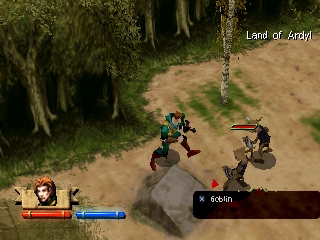
Darkstone is an action RPG that was released for the PlayStation in 1999. Developed by Darkstone Interactive and published by Gathering of Developers, this game combines elements of classic dungeon crawlers with real-time combat. It offers a unique blend of fantasy themes and cooperative gameplay, which was a notable feature during the late 90s gaming scene.
In Darkstone, players choose from various character classes, each with their unique abilities and skills. The gameplay revolves around exploring dungeons, battling enemies, and completing quests. Players can engage in both single-player and multiplayer modes, with the latter allowing friends to join in on the adventure. The game’s structure includes a mix of town exploration and dungeon crawling, where players gather loot and level up their characters.
Today, Darkstone holds a special place in the hearts of retro gaming enthusiasts. While it may not be as widely recognized as other RPGs from the era, its cooperative gameplay and engaging mechanics offer a nostalgic experience. It stands as a testament to the evolution of action RPGs and is worth trying for those who appreciate the genre's roots and the charm of classic PlayStation titles.
GAME INFO
- Platform
- PlayStation PSX
- Genre
- RPG
- Publisher
- Take-Two Interactive
- Developer
- Delphine Software International
- Released
- 1999
- Players
- 1-2
- Region
- USA
How to play Darkstone online
To get started with Darkstone, first choose your character class from the available options. Each class has different strengths and weaknesses, so consider what playstyle you prefer. After selecting your character, you will begin in a town where you can purchase items and gather quests before venturing into dungeons.
The core loop of Darkstone involves exploring these dungeons, defeating enemies, and completing quests to level up your character. Make sure to collect loot and manage your inventory wisely. Multiplayer mode allows friends to join in, adding a layer of fun and strategy as you tackle the challenges together. Familiarize yourself with the controls and mechanics early on to enhance your gameplay experience.
CONTROLS
Controls
- Arrow Keys — D-Pad / Movement
- X — Cross ( × )
- S — Square ( □ )
- Z — Triangle ( △ )
- A — Circle ( ○ )
- Q — L1 shoulder
- E — R1 shoulder
- Enter — Start
- V — Select
Darkstone FAQ
What makes Darkstone stand out among PlayStation PSX titles of its era?
This game offers a blend of real-time combat and RPG mechanics, which was somewhat unique at the time. Its cooperative multiplayer mode was also a notable feature, allowing players to team up in their adventure.
Is Darkstone an official release, a fan hack, a prototype, or another kind of build?
Darkstone is an official release developed by Darkstone Interactive and published by Gathering of Developers. It was released for the PlayStation in 1999.
In what year was Darkstone originally released?
Darkstone was originally released in 1999, contributing to the rich library of PlayStation games during that era.
You may also like
All PlayStation PSX games











GAME INFO
- Platform
- PlayStation PSX
- Genre
- RPG
- Publisher
- Take-Two Interactive
- Developer
- Delphine Software International
- Released
- 1999
- Players
- 1-2
- Region
- USA
COMMENTS (0)
No comments yet. Be the first to share your thoughts.