The game loads when you press Play · press “Play Now” inside the game if it asks.
Treasure Master (USA)
Treasure Master
About Treasure Master
- Nintendo Entertainment System
- Platformer
- 5· 0 votes
Treasure Master (USA) is a platformer game developed for the Nintendo Entertainment System (NES). Released in the late 1980s, it offers a unique blend of adventure and puzzle-solving elements. This title, while not as widely recognized as some of its contemporaries, provides a nostalgic experience for those interested in retro gaming culture.
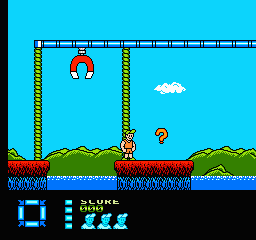
In Treasure Master, players take on the role of a treasure hunter navigating through various levels filled with challenges and obstacles. The gameplay involves collecting items and solving puzzles to progress, which is typical for platformers of this era. Players will encounter different environments that require strategic thinking and quick reflexes, making it a mix of action and brain-teasing mechanics that keeps the gameplay engaging.
What makes Treasure Master worth trying today is its charm and the nostalgic feel it evokes for retro gaming enthusiasts. While it may not have the same level of polish or fame as other NES titles, it offers a glimpse into the creativity of the platforming genre during the late 80s. For players who appreciate the history of video games, this title holds a special place, reflecting the adventurous spirit of early gaming.
GAME INFO
- Platform
- Nintendo Entertainment System
- Genre
- Platformer
- Developer
- Software Creations
- Released
- 1991
- Players
- 1
- Region
- USA
How to play Treasure Master online
To get started in Treasure Master, choose your game mode and begin at the first level. The objective is to collect treasures while navigating through various challenges. Each level contains puzzles that require you to think strategically to progress.
As you play, focus on gathering items and avoiding enemies. Timing your jumps and attacks is essential for overcoming obstacles. The core loop involves exploring levels, solving puzzles, and collecting treasures, which ultimately leads to advancing through the game. Familiarize yourself with the controls to maximize your efficiency in navigating the game's environments.
CONTROLS
Controls
- Arrow Keys — D-Pad / Movement
- X — A button (jump / confirm)
- S — B button (run / attack / cancel)
- Enter — Start / Pause
- V — Select
Treasure Master FAQ
Who developed Treasure Master?
The developer of Treasure Master is not widely documented.
Is Treasure Master exclusive to Nintendo Entertainment System or did it appear on other systems?
Treasure Master is primarily known as an NES title and did not appear on other systems.
Does Treasure Master have a multiplayer or co-op mode?
The game does not feature a multiplayer or co-op mode; it is a single-player experience.
You may also like
All Nintendo Entertainment System games











GAME INFO
- Platform
- Nintendo Entertainment System
- Genre
- Platformer
- Developer
- Software Creations
- Released
- 1991
- Players
- 1
- Region
- USA
COMMENTS (0)
No comments yet. Be the first to share your thoughts.