The game loads when you press Play · press “Play Now” inside the game if it asks.
Metro-Cross (Japan)
Metro-Cross
Inside Metro-Cross
- Nintendo Entertainment System
- Action
- 5· 0 votes
Metro-Cross is an action platformer developed by Namco, released in Japan for the Nintendo Entertainment System. This game debuted in the late 1980s, showcasing the charm and unique design typical of that era. While it may not be as widely recognized as other titles, it has a dedicated following among retro gaming enthusiasts who appreciate its arcade roots.
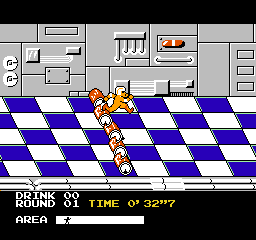
In Metro-Cross, players navigate a scrolling course filled with obstacles and challenges. The main objective is to reach the finish line before time runs out while avoiding hazards like pits and enemies. Players can jump and run to maneuver through the levels, collecting power-ups that enhance their abilities or provide extra time. The gameplay is straightforward yet requires quick reflexes and strategic thinking to succeed.
This title is worth trying for fans of classic arcade games, especially those who enjoy fast-paced platformers. While it may not have the depth of some contemporaries, it offers a nostalgic experience that captures the essence of arcade gaming. Metro-Cross serves as a reminder of the simplicity and challenge found in games of its time, making it a fun addition to any retro gaming library.
GAME INFO
- Platform
- Nintendo Entertainment System
- Genre
- Action
- Publisher
- Namco
- Developer
- Namco
- Released
- 1985
- Players
- 1
- Region
- Japan
How to play Metro-Cross online
Getting started with Metro-Cross involves selecting the game from the main menu, which is in Japanese. Although the language barrier may pose a challenge, players can navigate using the familiar layout of arcade-style games. Once in the game, the core loop revolves around racing through courses while avoiding obstacles and enemies, aiming to reach the finish line before the timer expires.
New players should focus on mastering the controls, particularly jumping and running, as these are crucial for navigating the various hazards. Collecting power-ups along the way will provide advantages, such as extra time or enhanced abilities. Understanding the layout of each course and practicing the timing of jumps will greatly improve your chances of success.
CONTROLS
Controls
- Arrow Keys — D-Pad / Movement
- X — A button (jump / confirm)
- S — B button (run / attack / cancel)
- Enter — Start / Pause
- V — Select
Metro-Cross FAQ
Who developed Metro-Cross?
Namco developed Metro-Cross, a company known for its influential arcade games and contributions to the gaming industry.
Does Metro-Cross have a multiplayer or co-op mode?
Metro-Cross is primarily a single-player experience, focusing on individual competition against the clock rather than cooperative or multiplayer play.
Is Metro-Cross exclusive to Nintendo Entertainment System or did it appear on other systems?
Metro-Cross was initially released for the NES in Japan, but it has also appeared in various compilations and arcade formats, expanding its reach beyond the NES.
You may also like
All Nintendo Entertainment System games











GAME INFO
- Platform
- Nintendo Entertainment System
- Genre
- Action
- Publisher
- Namco
- Developer
- Namco
- Released
- 1985
- Players
- 1
- Region
- Japan
COMMENTS (0)
No comments yet. Be the first to share your thoughts.