The game loads when you press Play · press “Play Now” inside the game if it asks.
Makai-Mura (Japan)
Makai-Mura
Makai-Mura - Platformer Classic
- Nintendo Entertainment System
- Platformer
- 5· 0 votes
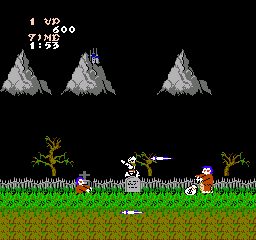
Makai-Mura, known as Ghosts 'n Goblins in the West, was released for the Nintendo Entertainment System in Japan. Developed by Capcom, this action platformer debuted in 1985 and has since become a staple in retro gaming. The title is known for its challenging gameplay and memorable characters, fitting seamlessly into the platforming genre of its era.
In Makai-Mura, players take on the role of a knight on a quest to rescue a princess from the clutches of demonic forces. The gameplay involves navigating through various levels filled with enemies and obstacles, using weapons and items to defeat foes. Players must master the mechanics of jumping and attacking while managing limited lives and continues, which adds to the game's difficulty and replay value.
This title remains worth exploring for its nostalgic charm and challenging gameplay. While it may not have the depth of some later platformers, it embodies the essence of 8-bit gaming with its pixel art and sound design. Fans of the genre will appreciate its influence on subsequent titles, making it a significant part of the NES library and a must-try for those interested in video game history.
GAME INFO
- Platform
- Nintendo Entertainment System
- Genre
- Platformer
- Released
- 1985
- Players
- 1
- Region
- Japan
How to play Makai-Mura online
To get started in Makai-Mura, begin by selecting your game mode and pressing Start. The game starts off with an introductory screen, followed by the first level, where you control the knight. Your objective is straightforward: traverse through levels, defeat enemies, and reach the end while collecting weapons and power-ups along the way.
As you navigate the levels, remember that timing your jumps and attacks is crucial. The game features a variety of enemies, each with unique patterns, so learning to dodge and counterattack effectively will help you progress. Since this title is in Japanese, familiarity with basic menu navigation will be beneficial, but the gameplay mechanics are intuitive enough for newcomers to pick up quickly.
CONTROLS
Controls
- Arrow Keys — D-Pad / Movement
- X — A button (jump / confirm)
- S — B button (run / attack / cancel)
- Enter — Start / Pause
- V — Select
Makai-Mura FAQ
Who developed Makai-Mura?
The game was developed by Capcom, a well-known company in the gaming industry with a rich history of creating iconic titles.
Is Makai-Mura exclusive to Nintendo Entertainment System or did it appear on other systems?
While it was released on the NES in Japan, Makai-Mura has been ported to various other platforms over the years, including arcade systems and modern consoles.
Is Makai-Mura an official release, a fan hack, a prototype, or another kind of build?
Makai-Mura is an official release by Capcom for the NES, known in the West as Ghosts 'n Goblins, and is not a fan hack or prototype.
You may also like
All Nintendo Entertainment System games











GAME INFO
- Platform
- Nintendo Entertainment System
- Genre
- Platformer
- Released
- 1985
- Players
- 1
- Region
- Japan
COMMENTS (0)
No comments yet. Be the first to share your thoughts.