CHOOSE A VERSION
2 versions · same consoleChoose an original release, regional version, revision, bootleg or clearly labelled ROM hack/mod, then press Play. Hacks may change the gameplay. Switching versions restarts the player.
Selected: Default · USA, Europe · USA, Europe
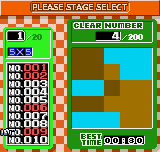
The game loads when you press Play · press “Play Now” inside the game if it asks.
Picture Puzzle (USA, Europe)
Picture Puzzle
Getting to Know Picture Puzzle
- NEO-GEO Pocket
- Puzzle
- 5· 0 votes
GAME INFO
- Platform
- NEO-GEO Pocket
- Genre
- Puzzle
- Players
- 1
- Region
- USA, Europe
How to play Picture Puzzle online
CONTROLS
Controls
- Arrow Keys: D-Pad / Movement
- X: A button
- S: B button
- Z: Y button
- A: X button
- Q: L shoulder
- E: R shoulder
- Enter: Start
- V: Select
Picture Puzzle FAQ
Which regions was Picture Puzzle released in?
It saw release in both the United States and Europe for the Neo Geo Pocket Color. The title was not released in Japan, making it a western-exclusive puzzle game.
In what year was Picture Puzzle originally released?
The exact release year is not widely documented in standard databases, but it likely appeared during the Neo Geo Pocket Color's active commercial period, around 1999 to 2001.
Is Picture Puzzle an official release, a fan hack, a prototype, or another kind of build?
It is an official commercial release for the Neo Geo Pocket Color. There are no indications that it is an unreleased prototype, fan hack, or translation of a different game.
You may also like
All NEO-GEO Pocket games SNK vs. Capcom - Card Fighters' Clash - SNK Version
 Samurai Shodown! 2 - Pocket Fighting Series
 SNK Gals' Fighters
 SNK vs. Capcom - Card Fighters' Clash - Capcom Version
 King of Fighters R-2 - Pocket Fighting Series
 Rockman - Battle & Fighters
 Fatal Fury F-Contact - Pocket Fighting Series
 King of Fighters R-1 - Pocket Fighting Series
 King of Fighters, The - Battle de Paradise
 Puyo Pop
 Metal Slug - 2nd Mission
 Neo Turf Masters
GAME INFO
- Platform
- NEO-GEO Pocket
- Genre
- Puzzle
- Players
- 1
- Region
- USA, Europe
COMMENTS (0)
No comments yet. Be the first to share your thoughts.