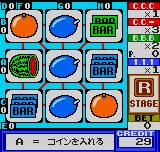
The game loads when you press Play · press “Play Now” inside the game if it asks.
Neo Cherry Master Color - Real Casino Series (World) (En,Ja)
Neo Cherry Master Color - Real Casino Series
Neo Cherry Master Color - Real Casino Series on NGP
- NEO-GEO Pocket
- Simulation
- 5· 0 votes
Neo Cherry Master Color - Real Casino Series is a slot machine simulation for the NEO-GEO Pocket Color, released as part of SNK's Real Casino Series. This version supports both English and Japanese languages, making it accessible to a wider audience. It came out during the handheld's late-90s to early-2000s lifespan, a time when SNK was porting its popular arcade and Neo Geo concepts to the smaller screen. Like many NGPC titles, it makes use of the system's crisp color display and clicky buttons for fast input.
What you actually do is play a digital slot machine, similar to the classic Cherry Master arcade cabinets. You start by inserting credits and then place bets by selecting coin values and lines to play. Pressing the spin button sets the reels in motion, and if matching symbols line up, you win credits. The game keeps track of your balance and offers typical slot machine features like hold buttons to keep certain reels, and a gamble mini-game where you can double your winnings by guessing card colors. It's straightforward and mirrors the real casino experience closely.
Today, Neo Cherry Master Color is a niche title that appeals to fans of digital recreations of old-school slot machines. It doesn't offer a deep story or complex mechanics; instead, it's a faithful, no-frills simulation that you can pick up for a few minutes. The NGPC library has a handful of casino games, and this one stands out for its clean interface and inclusion of both languages. If you enjoy simple luck-based play or are curious how SNK simulated gambling on a handheld, it's worth a look.
GAME INFO
- Platform
- NEO-GEO Pocket
- Genre
- Simulation
- Publisher
- SNK
- Players
- 1
- Region
- Worldwide
How to play Neo Cherry Master Color - Real Casino Series online
Getting started: When you load the game, you'll likely see a title screen. Press Start to proceed. The main menu lets you choose between slot machine modes or options. Use the Arrow Keys to navigate and X to confirm your selection. If you choose a slot machine, you'll be taken to the play screen.
To play, first insert credits by pressing the Select key or a designated button - this may vary, but usually the start or select button adds coins. Then use the D-Pad to adjust your bet: move left/right to select coin value, up/down to set number of lines. Once ready, press the A button (X key) to spin the reels. After the reels stop, winning lines will flash, and your balance updates. You can hold certain reels by pressing the B button (S key) on them before spinning again.
The core loop is simple: manage your credits, place bets, spin, and try to hit winning combinations. There may be a gamble feature after a win - press the A button to enter or B to collect. If you run out of credits, you'll need to insert more. The interface is mostly intuitive, but the Japanese version has text in Japanese; if you see the (En) variant, menus are in English. Take your time to understand the paytable visible on screen.
CONTROLS
Controls
- Arrow Keys: D-Pad / Movement
- X: A button
- S: B button
- Z: Y button
- A: X button
- Q: L shoulder
- E: R shoulder
- Enter: Start
- V: Select
Neo Cherry Master Color - Real Casino Series FAQ
Who developed Neo Cherry Master Color - Real Casino Series?
The game was published by SNK for the NEO-GEO Pocket Color, but the specific internal development team is not widely documented. It is part of SNK's Real Casino Series of handheld simulations.
Does Neo Cherry Master Color - Real Casino Series have a multiplayer or co-op mode?
No, this is a single-player only experience. It simulates a slot machine, which is inherently a solitary activity. There are no versus or cooperative modes.
Is Neo Cherry Master Color - Real Casino Series exclusive to NEO-GEO Pocket or did it appear on other systems?
It was released exclusively for the NEO-GEO Pocket Color and did not appear on other platforms. The Real Casino Series includes other titles on Neo Geo hardware, but this color version is specific to the handheld.
You may also like
All NEO-GEO Pocket games SNK vs. Capcom - Card Fighters' Clash - SNK Version
 Samurai Shodown! 2 - Pocket Fighting Series
 SNK Gals' Fighters
 SNK vs. Capcom - Card Fighters' Clash - Capcom Version
 King of Fighters R-2 - Pocket Fighting Series
 Rockman - Battle & Fighters
 Fatal Fury F-Contact - Pocket Fighting Series
 King of Fighters R-1 - Pocket Fighting Series
 King of Fighters, The - Battle de Paradise
 Puyo Pop
 Metal Slug - 2nd Mission
 Neo Turf Masters
GAME INFO
- Platform
- NEO-GEO Pocket
- Genre
- Simulation
- Publisher
- SNK
- Players
- 1
- Region
- Worldwide
COMMENTS (0)
No comments yet. Be the first to share your thoughts.