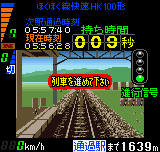
The game loads when you press Play · press “Play Now” inside the game if it asks.
Densha de Go! 2 on Neo Geo Pocket (Japan)
Densha de Go! 2 on Neo Geo Pocket
Densha de Go! 2 on Neo Geo Pocket on NGP
- NEO-GEO Pocket
- Simulation
- 5· 0 votes
GAME INFO
- Platform
- NEO-GEO Pocket
- Genre
- Simulation
- Players
- 1
- Region
- Japan
How to play Densha de Go! 2 on Neo Geo Pocket online
Getting Started
When you boot up Densha de Go! 2 on Neo Geo Pocket, the menus are entirely in Japanese. The main screen offers a few options: start a new run, view records, or adjust settings. Use the D-pad to highlight the top option (likely 'ゲームスタート') and press X to confirm. You'll then choose a route - the first line is usually the easiest, so pick that one if you're new.
The core gameplay is straightforward: drive your train from station to station without exceeding the speed limit or passing a stop signal. Watch the speedometer at the top of the screen and the distance marker on the bottom. As you approach a station, a bar will indicate where you need to stop - aim to halt exactly at the marker for a perfect stop. Press S to brake, but don't slam it - gentle, early braking is key. The game grades you on punctuality, safe operation, and fuel economy. If you miss a station or overshoot, you'll lose points.
Take your time and learn each route's speed changes and station distances. The game penalizes harsh braking and speeding, so smooth inputs matter. If you get lost, pressing V (Select) shows a map of the upcoming section. Save files are handled through an internal battery save - look for a save option in the menu (likely the second or third entry with 'セーブ' in it). Remember, this is a leisurely simulation, not a racer; the challenge is in the precision.
CONTROLS
Controls
- Arrow Keys: D-Pad / Movement
- X: A button
- S: B button
- Z: Y button
- A: X button
- Q: L shoulder
- E: R shoulder
- Enter: Start
- V: Select
Densha de Go! 2 on Neo Geo Pocket FAQ
Who developed Densha de Go! 2 on Neo Geo Pocket?
The original Densha de Go! 2 was developed by Taito for arcades, but the developer of the Neo Geo Pocket port is not well documented.
Is there anything iconic or memorable about Densha de Go! 2 on Neo Geo Pocket?
Its biggest claim to fame is being a full single-screen train simulator on a monochrome handheld, a real oddball in the Neo Geo Pocket library. The game's soundtrack and station chants are also quite catchy, and the scoring system rewards careful play over speed.
Can players save progress in Densha de Go! 2 on Neo Geo Pocket?
Yes, the cart uses a battery-backed save to keep your best scores and route completions. Look for the save option in the main menu (typically labeled 'セーブ') after finishing a run; the game auto-saves your performance data as well.
You may also like
All NEO-GEO Pocket games SNK vs. Capcom - Card Fighters' Clash - SNK Version
 Samurai Shodown! 2 - Pocket Fighting Series
 SNK Gals' Fighters
 SNK vs. Capcom - Card Fighters' Clash - Capcom Version
 King of Fighters R-2 - Pocket Fighting Series
 Rockman - Battle & Fighters
 Fatal Fury F-Contact - Pocket Fighting Series
 King of Fighters R-1 - Pocket Fighting Series
 King of Fighters, The - Battle de Paradise
 Puyo Pop
 Metal Slug - 2nd Mission
 Neo Turf Masters
GAME INFO
- Platform
- NEO-GEO Pocket
- Genre
- Simulation
- Players
- 1
- Region
- Japan
COMMENTS (0)
No comments yet. Be the first to share your thoughts.