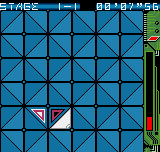
The game loads when you press Play · press “Play Now” inside the game if it asks.
Delta Warp (Japan)
Delta Warp
Getting to Know Delta Warp
- NEO-GEO Pocket
- Action
- 5· 0 votes
Delta Warp is a NEO-GEO Pocket title that originally released in Japan during the platform's commercial lifespan. Information about its developer and exact release year is not widely documented, but it belongs to the handheld's library of action-oriented games. For many years it remained a niche curiosity outside of Japan, accessible only through import.
As a typical action game for the system, the player likely controls a ship or character moving through levels while avoiding obstacles and engaging enemies. The core loop involves progressing through stages, collecting power-ups, and facing a boss at the end. The title hints at warp mechanics, but specific details are not confirmed in general sources.
Delta Warp offers a glimpse into the variety of the NEO-GEO Pocket's library. While it may not stand alongside heavy hitters like King of Fighters, its rarity and Japan-exclusive status make it an interesting find for collectors. Emulation allows modern players to experience this obscure piece of handheld history without importing original hardware.
GAME INFO
- Platform
- NEO-GEO Pocket
- Genre
- Action
- Publisher
- SNK
- Released
- 2000
- Region
- Japan
How to play Delta Warp online
Getting started with Delta Warp is straightforward. After booting the game, you will see a title screen; press Enter to start. The game's menus are in Japanese, so navigation may require experimentation. Use the Arrow Keys to move through options and X to confirm.
Once in the game, the D-Pad controls movement. The A button (X on keyboard) is used for your primary action, likely shooting or attacking. The B button (S) may trigger a secondary action or special move. Collect items that appear to power up your abilities. The goal is to survive and reach the end of each level.
If the title's warp mechanic is present, look for specific objects or triggers that teleport you to different areas. Since documentation is sparse, be prepared to explore. Using save states can help practice difficult segments.
CONTROLS
Controls
- Arrow Keys: D-Pad / Movement
- X: A button
- S: B button
- Z: Y button
- A: X button
- Q: L shoulder
- E: R shoulder
- Enter: Start
- V: Select
Delta Warp FAQ
Who developed Delta Warp?
The developer of Delta Warp is not widely documented in English sources. No credible attribution to a specific studio or individual is available.
Is Delta Warp exclusive to NEO-GEO Pocket or did it appear on other systems?
Delta Warp was released exclusively for the NEO-GEO Pocket in Japan. No known ports or versions exist for other platforms.
What makes Delta Warp stand out among NEO-GEO Pocket titles of its era?
Its rarity and Japan-only status give it collector appeal. The unique name hints at warp-based gameplay, though specific mechanics are poorly documented, adding to its mystique among enthusiasts.
You may also like
All NEO-GEO Pocket games SNK vs. Capcom - Card Fighters' Clash - SNK Version
 Samurai Shodown! 2 - Pocket Fighting Series
 SNK Gals' Fighters
 SNK vs. Capcom - Card Fighters' Clash - Capcom Version
 King of Fighters R-2 - Pocket Fighting Series
 Rockman - Battle & Fighters
 Fatal Fury F-Contact - Pocket Fighting Series
 King of Fighters R-1 - Pocket Fighting Series
 King of Fighters, The - Battle de Paradise
 Puyo Pop
 Metal Slug - 2nd Mission
 Neo Turf Masters
GAME INFO
- Platform
- NEO-GEO Pocket
- Genre
- Action
- Publisher
- SNK
- Released
- 2000
- Region
- Japan
COMMENTS (0)
No comments yet. Be the first to share your thoughts.