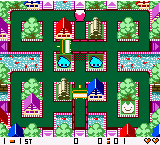
The game loads when you press Play · press “Play Now” inside the game if it asks.
Crush Roller (World) (En,Ja)
Crush Roller
Crush Roller on NGP
- NEO-GEO Pocket
- Action
- 5· 0 votes
GAME INFO
- Platform
- NEO-GEO Pocket
- Genre
- Action
- Publisher
- SNK
- Developer
- ADK
- Released
- 1999
- Players
- 1-2
- Region
- Worldwide
How to play Crush Roller online
Getting Started
Boot up Crush Roller and you will see a title screen. Press Start to enter the main menu, then choose between single-player or versus mode. In single-player, select a stage to begin. The goal is to crush all enemies on the screen by rolling over them, while avoiding being hit yourself.
Use the D-Pad to move your roller in four directions. Press the A button (X key) to confirm menu selections and to initiate a crush attack on enemies. The B button (S key) runs faster or cancels actions depending on context. Each stage ends when all enemies are eliminated, and new stages add more complex mazes and enemy patterns.
If you get stuck, there is no continue option per stage, so practice and learn the enemy movement patterns. The versus mode pits two players against each other in a split-screen duel, using the same controls. Since the game is in English and Japanese, menus are easy to navigate for English speakers.
CONTROLS
Controls
- Arrow Keys: D-Pad / Movement
- X: A button
- S: B button
- Z: Y button
- A: X button
- Q: L shoulder
- E: R shoulder
- Enter: Start
- V: Select
Crush Roller FAQ
Is Crush Roller exclusive to NEO-GEO Pocket or did it appear on other systems?
The NEO-GEO Pocket version of Crush Roller appears to be exclusive to that handheld platform. While a similar arcade game exists under the same name, the portable iteration was developed specifically for the NGP.
In what year was Crush Roller originally released?
Crush Roller was originally released for the NEO-GEO Pocket in 1999. This aligns with the platform's launch window and is consistent with other SNK titles from that era.
Does Crush Roller have a multiplayer or co-op mode?
Yes, Crush Roller includes a two-player versus mode. Players can compete head-to-head in a split-screen arena, adding a competitive element to the single-player stages.
You may also like
All NEO-GEO Pocket games SNK vs. Capcom - Card Fighters' Clash - SNK Version
 Samurai Shodown! 2 - Pocket Fighting Series
 SNK Gals' Fighters
 SNK vs. Capcom - Card Fighters' Clash - Capcom Version
 King of Fighters R-2 - Pocket Fighting Series
 Rockman - Battle & Fighters
 Fatal Fury F-Contact - Pocket Fighting Series
 King of Fighters R-1 - Pocket Fighting Series
 King of Fighters, The - Battle de Paradise
 Puyo Pop
 Metal Slug - 2nd Mission
 Neo Turf Masters
GAME INFO
- Platform
- NEO-GEO Pocket
- Genre
- Action
- Publisher
- SNK
- Developer
- ADK
- Released
- 1999
- Players
- 1-2
- Region
- Worldwide
COMMENTS (0)
No comments yet. Be the first to share your thoughts.