CHOOSE A VERSION
2 versions · same consoleChoose an original release, regional version, revision, bootleg or clearly labelled ROM hack/mod, then press Play. Hacks may change the gameplay. Switching versions restarts the player.
Selected: Default · USA · USA
The game loads when you press Play · press “Play Now” inside the game if it asks.
TV Sports Hockey (USA)
TV Sports Hockey
TV Sports Hockey on TG16
- NEC TURBOGRAFX-16
- Sports
- 5· 0 votes
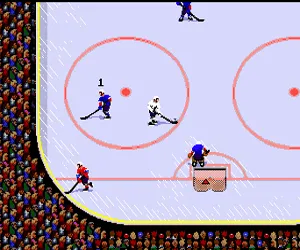
TV Sports Hockey is a sports title for the NEC TurboGrafx-16, part of the TV Sports series that also included football and baseball. It arrived in North America during the console's active years, offering a fast-paced hockey simulation. The game features overhead-view action and aims to replicate the feel of real ice hockey on a 16-bit system. While the specific developer and publisher aren't widely documented, it stands as a solid entry in the TurboGrafx-16 sports library.
Players control a team of skaters in a standard hockey match, skating up and down the rink to shoot the puck into the opponent's net. The core mechanics involve passing, shooting, and checking opponents. Matches are timed, and the goal is to score more goals than the opposing team before the clock runs out. The game includes options for penalty rules and period length typical of the era. Single-player mode pits you against a computer opponent, while a two-player mode lets you face off against a friend.
Today, TV Sports Hockey offers a simpler, more straightforward hockey experience compared to modern sims. It captures the arcade-like feel common to early 90s sports games, with responsive controls and quick matches. For retro hockey fans, it's a fun way to experience the genre on the TurboGrafx-16, though it lacks the depth of contemporary franchises. It remains a niche title worth trying for collectors or anyone curious about 16-bit sports gaming.
GAME INFO
- Platform
- NEC TURBOGRAFX-16
- Genre
- Sports
- Region
- USA
How to play TV Sports Hockey online
Getting started: When you boot up TV Sports Hockey, you'll see a title screen. Press the Start button (Enter) to proceed. You can typically choose between a single-player game against the computer or a two-player versus mode. The team selection screen lets you pick from available teams; use the D-Pad to highlight and confirm with the A button (X).
The core loop is straightforward: you control a skater on the rink, moving with the D-Pad. Press the B button (S) to pass or shoot the puck depending on context. Use the A button (X) for a speed burst or check, but the exact mapping may vary. The objective is to score goals while preventing the opponent from doing the same. Matches have a set time limit and you can view the score and period on screen.
If you're playing on the emulator, note that the controls above mirror the standard TG-16 layout. Since this is an English release, menus are in English and easy to navigate. A quick tip: practice passing to teammates to keep possession, as head-on checks can knock the puck loose. The game is pick-up-and-play friendly, so you should be able to jump into a match within seconds.
CONTROLS
Controls
- Arrow Keys: D-Pad / Movement
- X: I button
- S: II button
- Enter: Run / Start
- V: Select
TV Sports Hockey FAQ
Is TV Sports Hockey considered easy to pick up or challenging?
The game is fairly accessible for newcomers. Controls are simple, with basic skating and shooting actions, but timing and positioning add a moderate challenge. It won't overwhelm you like some deeper simulations.
Is there anything iconic or memorable about TV Sports Hockey?
It's part of the TV Sports series on the TurboGrafx-16, a brand that attempted to bring arcade-style sports to the console. The game is remembered for its smooth scrolling and responsive play, though it never reached the popularity of titles like NHL on Sega Genesis.
Is TV Sports Hockey exclusive to NEC TURBOGRAFX-16 or did it appear on other systems?
This version appears exclusively on the TurboGrafx-16. Other platforms had different hockey titles but not this exact TV Sports entry. It's a console-specific sports release.
You may also like
All NEC TURBOGRAFX-16 games











GAME INFO
- Platform
- NEC TURBOGRAFX-16
- Genre
- Sports
- Region
- USA
COMMENTS (0)
No comments yet. Be the first to share your thoughts.