The game loads when you press Play · press “Play Now” inside the game if it asks.
Toilet Kids (Japan)
Toilet Kids
Toilet Kids: TG16 Shooter
- NEC TURBOGRAFX-16
- Shooter
- 5· 0 votes
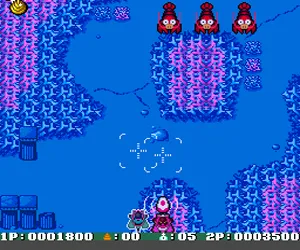
Players control a small child flying through various stages, blasting enemies and collecting power-ups to upgrade their weapon. The core loop is standard for the genre: dodge enemy fire, destroy waves of foes, and defeat a boss at the end of each level. The game uses a typical life system with continues, and there's no story beyond the basic premise of "fight through weird levels." It's a short, arcade-style experience designed for high score chasing rather than deep exploration.
Toilet Kids is worth a look today mainly for its bizarre theme and as a curiosity in the PC Engine library. It's a competent but unremarkable shooter mechanically, similar to other small-budget HuCards of the time. If you enjoy silly premises or are a completionist for Japanese shooters, it provides a brief, challenging diversion. Just don't expect deep gameplay or polished graphics - it's a simple, niche title that stands out mostly for its unusual concept.
GAME INFO
- Platform
- NEC TURBOGRAFX-16
- Genre
- Shooter
- Publisher
- Media Rings
- Developer
- Bits Laboratory
- Released
- 1992
- Region
- Japan
How to play Toilet Kids online
Getting Started
When you boot up Toilet Kids, you'll see a title screen in Japanese. Press Enter (Start) to reach the main menu. There may be options like "Start Game" or "Config" - if you cannot read them, simply press Start again to begin playing. The game will ask for player count; press A (X key) to confirm. Once in the game, you control your character with the arrow keys and shoot with the B button (S key). Collect floating items to upgrade your weapon or gain temporary invincibility.
The core loop is simple: move left to right across each stage, shooting everything that moves. Watch out for enemy bullets and obstacles - your hitbox is small but you can still get hit easily. After a few stages, you'll face a boss. If you die, you'll restart at a checkpoint with downgraded weapons. You have a limited number of continues, so practice to memorize enemy patterns and stage layouts. Since all text is in Japanese, rely on trial and error when navigating menus.
CONTROLS
Controls
- Arrow Keys: D-Pad / Movement
- X: I button
- S: II button
- Enter: Run / Start
- V: Select
Toilet Kids FAQ
Who developed Toilet Kids?
Bits Laboratory handled the development, while Media Rings published the game for the PC Engine in 1992.
Is Toilet Kids an official release, a fan hack, a prototype, or another kind of build?
It is an official commercial release, sold at retail in Japan for the PC Engine (TurboGrafx-16).
In what year was Toilet Kids originally released?
The game came out in 1992, exclusively for the Japanese market.
You may also like
All NEC TURBOGRAFX-16 games











GAME INFO
- Platform
- NEC TURBOGRAFX-16
- Genre
- Shooter
- Publisher
- Media Rings
- Developer
- Bits Laboratory
- Released
- 1992
- Region
- Japan
COMMENTS (0)
No comments yet. Be the first to share your thoughts.