The game loads when you press Play · press “Play Now” inside the game if it asks.
Timeball (USA)
Timeball
Timeball: TG16 Puzzle
- NEC TURBOGRAFX-16
- Puzzle
- 5· 0 votes
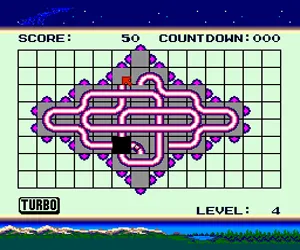
Timeball is a puzzle game released for the NEC TurboGrafx-16 in North America. The exact release year and developer are not widely documented, but it belongs to the system's library of puzzle titles from the early 1990s. It was published under the TG16 banner, a console that saw a modest but dedicated lineup of unique games.
In Timeball, the player faces a playing field filled with colored balls. The core objective is to clear these balls by grouping them or matching them in some way, though the specific rules are not fully recorded. Typical puzzle games of the era involve moving pieces with the D-pad and using buttons to rotate or drop items. The gameplay is turn-based or time-based, demanding quick thinking and pattern recognition.
Timeball remains a curiosity for TurboGrafx collectors and puzzle enthusiasts. It is not a blockbuster title, but its simple premise and challenging levels offer a decent diversion. If you enjoy classic falling-block puzzles with a unique twist, this might be worth a look. Its obscurity adds a certain charm for those exploring the TG16's lesser-known releases.
GAME INFO
- Platform
- NEC TURBOGRAFX-16
- Genre
- Puzzle
- Publisher
- NEC
- Developer
- Hudson Soft
- Players
- 1
- Region
- USA
How to play Timeball online
Getting Started: When you start a new game, you will likely be presented with a title screen and a main menu. Press Start to begin. The exact menu options are unknown, but most puzzle games of this era use a simple interface. Use the D-pad to navigate and the A or B button to confirm.
The gameplay revolves around moving or arranging colored balls on a grid. Your goal is to clear the field by matching colors or forming specific patterns. Pay attention to the color cues and try to plan ahead. The game may introduce new elements as you progress, such as faster falling speeds or obstacles.
If you get stuck, look for power-ups or special blocks that reset the board. Practice is key - repetition helps you recognize patterns faster. There is no known save feature, so aim for high scores in one sitting.
CONTROLS
Controls
- Arrow Keys: D-Pad / Movement
- X: I button
- S: II button
- Enter: Run / Start
- V: Select
Timeball FAQ
Who developed Timeball?
The developer of Timeball is not widely documented in reliable retro gaming sources. It was likely a small studio or individual working within the TurboGrafx-16 publishing ecosystem.
Can players save progress in Timeball?
Most TurboGrafx-16 puzzle games of this era did not include battery-backed saving. It is safe to assume Timeball offers no save function, relying on continuous play or high score tracking instead.
What type of game is Timeball?
Timeball is a puzzle game for the TurboGrafx-16. It involves manipulating colored balls to clear them from the playing field, fitting the classic match-or-stack puzzle genre.
You may also like
All NEC TURBOGRAFX-16 games











GAME INFO
- Platform
- NEC TURBOGRAFX-16
- Genre
- Puzzle
- Publisher
- NEC
- Developer
- Hudson Soft
- Players
- 1
- Region
- USA
COMMENTS (0)
No comments yet. Be the first to share your thoughts.