The game loads when you press Play · press “Play Now” inside the game if it asks.
Pro Yakyuu World Stadium '91 (Japan)
Pro Yakyuu World Stadium '91
Pro Yakyuu World Stadium '91 Overview
- NEC TURBOGRAFX-16
- Sports
- 5· 0 votes
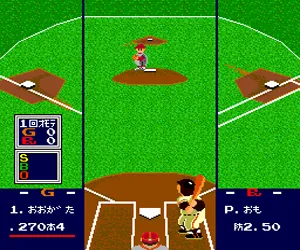
Pro Yakyuu World Stadium '91 is a baseball simulation released exclusively in Japan for the NEC TurboGrafx-16 (PC Engine) in 1991. Part of the long-running World Stadium series, this title brings arcade-style baseball to the platform with a focus on fast-paced gameplay that doesn't get bogged down in deep simulation. It's a sports game through and through, built for quick matches and pickup-and-play sessions with friends or the computer.
When you boot up the game, you select a team and face off in a standard nine-inning baseball game. The core loop involves pitching, batting, fielding, and base running. You control the pitcher's aim and pitch type, then switch to batting to time your swing. Fielding is automated to some extent, but you can still make throws to specific bases. The menus are entirely in Japanese, so knowing the layout helps, but the gameplay is intuitive if you understand baseball basics. You can play against the AI or a second player.
Today, Pro Yakyuu World Stadium '91 is a solid pick for retro baseball fans who want an arcade-style experience on the TurboGrafx-16. It doesn't have the depth of modern baseball sims, but its pick-up-and-play nature makes it fun for quick sessions. The Japanese-only menus can be a hurdle, but once you memorize the few options, it's easy to enjoy. It's a niche title even among TurboGrafx-16 sports games, but worth checking out if you're curious about Japanese baseball games from that era.
GAME INFO
- Platform
- NEC TURBOGRAFX-16
- Genre
- Sports
- Released
- 1991
- Players
- 1-2
- Region
- Japan
How to play Pro Yakyuu World Stadium '91 online
Getting Started
When you first start Pro Yakyuu World Stadium '91, you'll see a title screen with a few options. Since the menus are in Japanese, you'll need to navigate by trial and error or use a guide. The main menu likely offers a single-player exhibition game, a two-player mode, and perhaps a league mode. Press Start on the title screen to advance, then use the D-Pad to highlight an option and press X to confirm. The core gameplay loop is straightforward: you pitch, then bat, then field. During pitching, move the cursor with the D-Pad to aim and press a button to throw. For batting, time your swing by pressing X as the pitch arrives. Fielding is mostly automatic; you'll manually throw to bases by pressing the corresponding direction. The game keeps track of outs, runs, and innings just like real baseball. If you're new to the game, start with a quick exhibition match to get a feel for the controls and pacing. There's no saving progress, so any league or season mode must be completed in one sitting.CONTROLS
Controls
- Arrow Keys: D-Pad / Movement
- X: I button
- S: II button
- Enter: Run / Start
- V: Select
Pro Yakyuu World Stadium '91 FAQ
Can players save progress in Pro Yakyuu World Stadium '91?
The game does not include any save or password feature. All progress must be completed in a single session, which was common for many sports titles on the TurboGrafx-16.
Is Pro Yakyuu World Stadium '91 exclusive to NEC TURBOGRAFX-16 or did it appear on other systems?
This title is exclusive to the NEC TurboGrafx-16 (PC Engine) and was never released on other platforms. It is a Japan-only entry in the World Stadium series.
Which regions was Pro Yakyuu World Stadium '91 released in?
Only in Japan. The game never saw an official release in North America or Europe, so it remains a niche import title for collectors and emulation users.
You may also like
All NEC TURBOGRAFX-16 games











GAME INFO
- Platform
- NEC TURBOGRAFX-16
- Genre
- Sports
- Released
- 1991
- Players
- 1-2
- Region
- Japan
COMMENTS (0)
No comments yet. Be the first to share your thoughts.