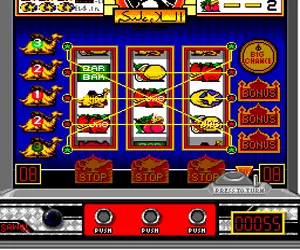
The game loads when you press Play · press “Play Now” inside the game if it asks.
PC Pachi-Slot (Japan)
PC Pachi-Slot
About PC Pachi-Slot
- NEC TURBOGRAFX-16
- Simulation
- 5· 0 votes
GAME INFO
- Platform
- NEC TURBOGRAFX-16
- Genre
- Simulation
- Players
- 1
- Region
- Japan
How to play PC Pachi-Slot online
The controls for PC Pachi-Slot are minimal since it's a one-button gambling game. On the TurboGrafx-16 pad, you'll mostly use the D-Pad to navigate menus and press the A button (X key) to confirm selections or spin. The B button (S key) might cancel or back out of a menu. The Start button (Enter) begins gameplay, and Select (V) may toggle options like bet amount.
To start playing, boot the game and you'll see a title screen in Japanese. Press Start (Enter) to go to the main game screen. Use the D-Pad to highlight options such as how many credits to bet per spin (often 1, 3, or max). Confirm with the A button (X). After setting your bet, the slot reels will appear. Press A again to spin them. The reels will stop automatically, and any winning combination will flash and add credits to your balance. The game continues until you run out of credits or choose to exit via the select button menu.
Because menus are entirely in Japanese, recognize common words like スタート (start), ベット (bet), and クレジット (credit). If you see numbers, that's your credit count. The core loop is straightforward: set bet, spin, collect wins, repeat. There's no skill beyond choosing a bet size, so just enjoy the flashing lights and sounds. If you hit a rare jackpot, the game might play a special jingle. Don't expect any mini-games or bonus features - it's a faithful slot machine simulation.
CONTROLS
Controls
- Arrow Keys: D-Pad / Movement
- X: I button
- S: II button
- Enter: Run / Start
- V: Select
PC Pachi-Slot FAQ
Is PC Pachi-Slot considered easy to pick up or challenging?
It is extremely easy to pick up since it's a direct simulation of a slot machine. The only challenge comes from reading Japanese menus and understanding the payout table, which is not explained outside the game itself. Gameplay is entirely luck-based, so there's no skill barrier to entry.
What type of game is PC Pachi-Slot?
It is a gambling simulation that recreates a pachi-slot (Japanese slot machine) experience. The focus is on pulling a lever and watching reels spin, with no action, story, or puzzle elements. Think of it as a virtual casino game for the TurboGrafx-16.
Is PC Pachi-Slot exclusive to NEC TURBOGRAFX-16 or did it appear on other systems?
It appears this title was released only for the NEC TurboGrafx-16 (PC Engine) in Japan. There are no documented ports or versions for other platforms, though similar pachi-slot games appeared on many Japanese consoles of the era under different names.
You may also like
All NEC TURBOGRAFX-16 games











GAME INFO
- Platform
- NEC TURBOGRAFX-16
- Genre
- Simulation
- Players
- 1
- Region
- Japan
COMMENTS (0)
No comments yet. Be the first to share your thoughts.