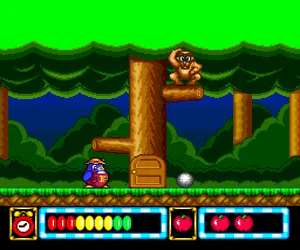
The game loads when you press Play · press “Play Now” inside the game if it asks.
Niko Niko Pun (Japan)
Niko Niko Pun
Getting to Know Niko Niko Pun
- NEC TURBOGRAFX-16
- Puzzle
- 5· 0 votes
GAME INFO
- Platform
- NEC TURBOGRAFX-16
- Genre
- Puzzle
- Region
- Japan
How to play Niko Niko Pun online
Getting Started
Since Niko Niko Pun is a Japanese-only release, the menus and on-screen text are entirely in Japanese. Start by pressing Enter to advance past any title screen, then use the D-pad and A button to navigate menus. Trial and error might be necessary to understand options, but most puzzle games have straightforward selections.
The core loop involves solving puzzles presented one after another. Each screen likely introduces a new challenge requiring you to manipulate objects or match symbols using the D-pad and action buttons. Pay attention to visual feedback like animations or sound effects to confirm correct moves.
If you get stuck, try experimenting with every button - the B, Y, X, and shoulder buttons might have secondary functions. There is no in-game tutorial, so patience and a willingness to experiment are your best tools.
CONTROLS
Controls
- Arrow Keys: D-Pad / Movement
- X: I button
- S: II button
- Enter: Run / Start
- V: Select
Niko Niko Pun FAQ
What type of game is Niko Niko Pun?
Niko Niko Pun appears to be a puzzle game, likely involving wordplay or matching smiling faces. The exact mechanics are not widely documented, but the cheerful title points toward a casual, logic-based experience.
Is Niko Niko Pun exclusive to NEC TURBOGRAFX-16 or did it appear on other systems?
The game was only released for the NEC TurboGrafx-16 (PC Engine) in Japan, with no known ports to other platforms. It remains a console exclusive.
Roughly how long does it take to finish Niko Niko Pun?
Completion time is not well documented, but similar puzzle games from the era typically take one to three hours. The short length was common for budget or casual titles on the platform.
You may also like
All NEC TURBOGRAFX-16 games











GAME INFO
- Platform
- NEC TURBOGRAFX-16
- Genre
- Puzzle
- Region
- Japan
COMMENTS (0)
No comments yet. Be the first to share your thoughts.