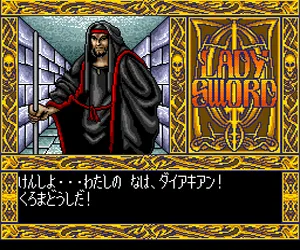
The game loads when you press Play · press “Play Now” inside the game if it asks.
Lady Sword (Japan)
Lady Sword
Lady Sword Overview
- NEC TURBOGRAFX-16
- RPG
- 5· 0 votes
Lady Sword is an eroge RPG released for the NEC TurboGrafx-16 (PC Engine) in Japan back in 1992. It was developed and published by Games Express, a company known for adult-oriented titles during the system's lifecycle. This is a Japanese exclusive, so it never saw a Western release or localization.
As an RPG, you control a protagonist navigating dungeons and towns, engaging in turn-based combat against monsters. The eroge aspect means there are adult scenes triggered through certain events or choices, common for the genre on PC Engine. The game features character customization and progression through leveling up, with equipment to buy and spells to learn along the way.
For collectors of PC Engine adult RPGs, Lady Sword is a notable example of Games Express's output. It sits alongside titles like Dragon Knight and offers a mix of traditional RPG grinding with adult content. It's a niche piece of retro gaming history, worth exploring if you enjoy obscure Japanese games from that era.
GAME INFO
- Platform
- NEC TURBOGRAFX-16
- Genre
- RPG
- Publisher
- Games Express
- Developer
- Games Express
- Released
- 1992
- Players
- 1
- Region
- Japan
How to play Lady Sword online
Getting started with Lady Sword can be tricky if you don't read Japanese. The title screen presents a menu in Japanese; the first option is usually 'New Game' (はじめから). Use arrow keys to navigate and press X to confirm. The game opens with a brief story introduction, then you're placed in a starting town.
Talk to NPCs to gather clues and buy equipment from shops using the select button to view items. Battles are turn-based: you choose actions from a menu, with attack, magic, and item options. Victory gives experience and gold to level up your character. The core loop involves exploring dungeons, fighting enemies, and advancing the story, with adult scenes triggered by specific events or choices.
Menus are all in Japanese, so knowing basic katakana or hiragana helps. Look for common symbols like a sword for attack, a heart for healing, and a star for magic. Save your progress at inns or save points found in towns and dungeons.
CONTROLS
Controls
- Arrow Keys: D-Pad / Movement
- X: I button
- S: II button
- Enter: Run / Start
- V: Select
Lady Sword FAQ
Roughly how long does it take to finish Lady Sword?
A typical playthrough runs around 10 to 15 hours depending on how much you explore and grind. The adult scenes can add some extra time if you seek them all out.
Is Lady Sword exclusive to NEC TURBOGRAFX-16 or did it appear on other systems?
Lady Sword was released only for the NEC TurboGrafx-16 (PC Engine) in Japan. It did not appear on other platforms or receive international releases.
What makes Lady Sword stand out among NEC TURBOGRAFX-16 titles of its era?
Its combination of traditional RPG mechanics with adult content was fairly common on PC Engine, but Lady Sword is remembered for its detailed sprite work and multiple ending paths. The game's difficulty curve also sets it apart from some simpler eroge titles.
You may also like
All NEC TURBOGRAFX-16 games











GAME INFO
- Platform
- NEC TURBOGRAFX-16
- Genre
- RPG
- Publisher
- Games Express
- Developer
- Games Express
- Released
- 1992
- Players
- 1
- Region
- Japan
COMMENTS (0)
No comments yet. Be the first to share your thoughts.