Kyuukyoku Mahjong II (Japan)
What is Kyuukyoku Mahjong II (Japan)?
Kyuukyoku Mahjong II is a tile-matching board game released exclusively for the NEC TurboGrafx-16 (PC Engine) in Japan. It's the sequel to the original Kyuukyoku Mahjong, and like its predecessor it focuses on the classic Chinese game of Mahjong solitaire and competitive play. The developer and publisher information is not widely documented, but this title is part of a niche library of Japanese-only games that leveraged the TurboGrafx-16's hardware to present detailed tile graphics and simple yet addictive gameplay.
The core gameplay revolves around drawing and discarding tiles to form winning hands, following standard Japanese Mahjong rules. Players compete against computer opponents in a series of matches, with the goal of accumulating points and achieving special hands. The interface is menu-driven, and the game likely includes multiple modes such as single-player tournament or versus play. Since it's a Japanese release, all menus and instructions are in Japanese, so familiarity with basic Mahjong rules and some kanji knowledge helps.
As a Japan-exclusive title, Kyuukyoku Mahjong II offers a glimpse into the local market's taste for simulated board games on home consoles. It's not a groundbreaking title, but it's a competent example of the genre for the system. Fans of traditional Mahjong games who enjoy retro hardware will appreciate its straightforward presentation and the challenge of mastering the tile-matching mechanics. If you're curious about how Mahjong was adapted to early 16-bit consoles, this is a solid pick.
How to Play Kyuukyoku Mahjong II (Japan) Online
Getting Started
Start by selecting a game mode from the title screen. Typically Mahjong games on the PC Engine offer either a single-player tournament against AI opponents or a free play mode. Use the D-Pad to navigate menus and press X to confirm your choice. The game is entirely in Japanese, so you may need to experiment or reference online guides to understand menu options. A common first step is to choose a difficulty level or character.
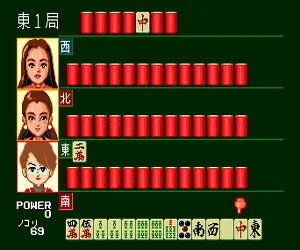
Once in a match, you'll see your hand of tiles at the bottom and the discard pile in the center. Your goal is to build a winning Mahjong hand by drawing and discarding tiles. Use the D-Pad to select a tile from your hand and press S to discard it. The game will automatically check for winning conditions after each draw. Pay attention to the computer opponents' discards to avoid giving them what they need.
The core loop repeats: draw a tile, evaluate your hand, discard one tile, and wait for your next turn. Computer opponents play quickly, so you'll need to plan ahead. Special actions like declaring a win, calling a tile (pon, chi, kan) may require pressing specific buttons - and the menu options will appear when available. If you're new to Japanese Mahjong, reviewing the basic rules beforehand will help you understand the game flow.
Kyuukyoku Mahjong II (Japan) Keyboard Controls
Controls
- Arrow Keys: D-Pad / Movement
- X: I button
- S: II button
- Enter: Run / Start
- V: Select
Comments (0)











