The game loads when you press Play · press “Play Now” inside the game if it asks.
Ganbare! Golf Boys (Japan)
Ganbare! Golf Boys
Inside Ganbare! Golf Boys
- NEC TURBOGRAFX-16
- Sports
- 5· 0 votes
GAME INFO
- Platform
- NEC TURBOGRAFX-16
- Genre
- Sports
- Publisher
- NCS
- Developer
- Masaya
- Released
- 1991
- Players
- 1-2
- Region
- Japan
How to play Ganbare! Golf Boys online
Getting Started
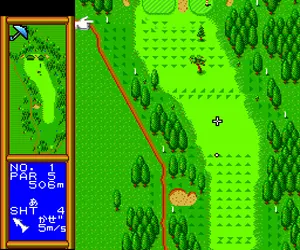
When you boot up Ganbare! Golf Boys, you will be greeted by a title screen with Japanese text. Press Enter to start. You will likely see options for a single round or two-player mode - the menus are navigated with the D-Pad and confirmed with the X button (A). The game does not include an English translation, so you may need to experiment or consult a guide, but the structure is typical for golf games: select a course, choose your golfer, and tee off.
The core gameplay revolves around a three-click swing meter: press X once to start the power bar moving, again to set power, and a third time to set accuracy. The D-Pad lets you aim left or right and choose clubs. A few minutes of trial and error will get you comfortable with the timing. The B button (S key) can be used to cancel selections or go back in menus.
If you are playing alone, focus on learning the power meter and reading the wind indicator at the top of the screen. In two-player mode, players take turns. The computer AI offers a decent challenge, but the real fun is head-to-head with a friend. Since this is a Japanese-only title, memorizing the small number of menu options (like "Start Game" or "Options") will make the experience smoother.
CONTROLS
Controls
- Arrow Keys: D-Pad / Movement
- X: I button
- S: II button
- Enter: Run / Start
- V: Select
Ganbare! Golf Boys FAQ
Who developed Ganbare! Golf Boys?
The game was developed by Masaya, a brand under Nihon Computer System (NCS), in collaboration with Dual. Masaya handled many PC Engine sports titles during the early 90s.
Does Ganbare! Golf Boys have a multiplayer or co-op mode?
Yes, it includes a two-player head-to-head mode. Players take turns competing on the same course, making it a straightforward versus experience rather than cooperative play.
Which regions was Ganbare! Golf Boys released in?
Ganbare! Golf Boys was released exclusively in Japan for the PC Engine. It never received an official Western release for the TurboGrafx-16 or any other platform.
You may also like
All NEC TURBOGRAFX-16 games











GAME INFO
- Platform
- NEC TURBOGRAFX-16
- Genre
- Sports
- Publisher
- NCS
- Developer
- Masaya
- Released
- 1991
- Players
- 1-2
- Region
- Japan
COMMENTS (0)
No comments yet. Be the first to share your thoughts.