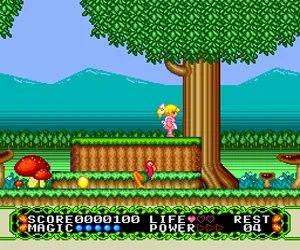
The game loads when you press Play · press “Play Now” inside the game if it asks.
Fushigi no Yume no Alice (Japan)
Fushigi no Yume no Alice
Fushigi no Yume no Alice Overview
- NEC TURBOGRAFX-16
- Platformer
- 5· 0 votes
GAME INFO
- Platform
- NEC TURBOGRAFX-16
- Genre
- Platformer
- Developer
- FACE
- Players
- 1
- Region
- Japan
How to play Fushigi no Yume no Alice online
Getting Started
When you start the game, you'll see a title screen with Japanese text. Press Enter to begin a new game. The core loop is straightforward: move Alice left or right with the D-pad, jump over pits and onto platforms with the A button, and use the B button to attack enemies or interact with certain objects. Each level scrolls horizontally, and your goal is to reach the end without losing all your lives.
Since the game is Japan-only, all menus and on-screen text are in Japanese. However, the interface is minimal - typically showing a score, lives, and a health bar or timer. If you get a game over, you can continue by pressing Start on the continue screen. The controls are responsive, and the difficulty ramps up gradually. There is no save functionality, so you'll need to finish the game in one sitting.
CONTROLS
Controls
- Arrow Keys: D-Pad / Movement
- X: I button
- S: II button
- Enter: Run / Start
- V: Select
Fushigi no Yume no Alice FAQ
Roughly how long does it take to finish Fushigi no Yume no Alice?
Completion times vary by player skill, but most runs fall between 30 minutes to an hour for a normal playthrough. The game is not particularly long, consistent with many platformers of its era.
Is Fushigi no Yume no Alice exclusive to NEC TURBOGRAFX-16 or did it appear on other systems?
Fushigi no Yume no Alice was released only for the NEC TurboGrafx-16 (PC Engine) in Japan. It never appeared on other consoles or computers.
In what year was Fushigi no Yume no Alice originally released?
The exact release year is not widely documented in English sources. It is generally believed to have been released in the early 1990s, but no official year is confirmed.
You may also like
All NEC TURBOGRAFX-16 games











GAME INFO
- Platform
- NEC TURBOGRAFX-16
- Genre
- Platformer
- Developer
- FACE
- Players
- 1
- Region
- Japan
COMMENTS (0)
No comments yet. Be the first to share your thoughts.