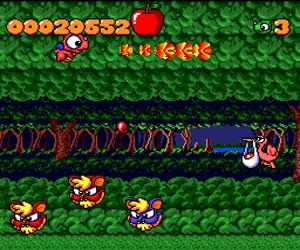
The game loads when you press Play · press “Play Now” inside the game if it asks.
Coryoon - Child of Dragon (Japan)
Coryoon - Child of Dragon
Coryoon - Child of Dragon: TG16 Shooter
- NEC TURBOGRAFX-16
- Shooter
- 5· 0 votes
GAME INFO
- Platform
- NEC TURBOGRAFX-16
- Genre
- Shooter
- Publisher
- Naxat Soft
- Developer
- Naxat Soft
- Released
- 1991
- Region
- Japan
How to play Coryoon - Child of Dragon online
Getting started: When you boot Coryoon, you will see a title screen in Japanese. Press the Start button to proceed to the ship selection screen. You choose which of three dragon characters to pilot, each with a different weapon spread and speed. Once selected, the game begins automatically.
Core gameplay is classic side-scrolling shooting: you fly from left to right, dodging enemy bullets and obstacles while blasting foes that appear from all sides. Your dragon shoots a main weapon and can collect power-ups that drop from destroyed enemies. These power-ups upgrade your shot or add side options. Pay attention to the color of enemies and pickups, as they indicate different weapon types.
Because the game is in Japanese, the menus for options (difficulty, button config) may be hard to navigate. The default settings are fine for a first playthrough. The game has a continues system, so don't worry about dying early. Focus on learning enemy patterns and collecting the right power-ups for each stage. This is a challenging but fair shooter that rewards practice.
CONTROLS
Controls
- Arrow Keys: D-Pad / Movement
- X: I button
- S: II button
- Enter: Run / Start
- V: Select
Coryoon - Child of Dragon FAQ
Who developed Coryoon - Child of Dragon?
Coryoon was developed and published by Naxat Soft. The company was active in the late 80s and early 90s, creating several shoot 'em ups for the PC Engine.
Is Coryoon - Child of Dragon exclusive to NEC TURBOGRAFX-16 or did it appear on other systems?
Coryoon was released only for the NEC TurboGrafx-16 (PC Engine) in Japan. It never saw a port to other consoles or a Western release.
What type of game is Coryoon - Child of Dragon?
It is a side-scrolling shoot 'em up (shmup). Players control a dragon child and must shoot down waves of enemies and bosses across horizontally scrolling stages.
You may also like
All NEC TURBOGRAFX-16 games











GAME INFO
- Platform
- NEC TURBOGRAFX-16
- Genre
- Shooter
- Publisher
- Naxat Soft
- Developer
- Naxat Soft
- Released
- 1991
- Region
- Japan
COMMENTS (0)
No comments yet. Be the first to share your thoughts.