The game loads when you press Play · press “Play Now” inside the game if it asks.
Barunba (Japan)
Barunba
Barunba Overview
- NEC TURBOGRAFX-16
- Shooter
- 5· 0 votes
GAME INFO
- Platform
- NEC TURBOGRAFX-16
- Genre
- Shooter
- Publisher
- Namco
- Developer
- Namco
- Released
- 1990
- Players
- 1
- Region
- Japan
How to play Barunba online
Getting Started
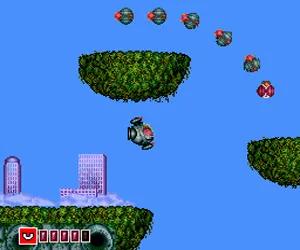
Select the game from the title screen using the D-Pad and press X to start. The opening screen is in Japanese, but the core gameplay is straightforward: steer your ship with the Arrow Keys, fire with S, and dodge enemy patterns. Power-ups appear as floating icons - learn what each does by trial and error since there's no manual.
The level structure follows a classic arcade shooter loop: survive each stage, defeat a mid-boss and an end-boss, then move on. Your ship has a standard shot that can be upgraded. Watch for colored orbs that change your spread or laser type. If you get hit, you lose your current weapon level, so try to keep a safe distance from fliers and turrets.
Since menus are entirely in Japanese, memorizing the order of options is helpful. The first option on the title screen is usually "Start," with "Continue" or "High Score" below it. Once you're in the game, focus on collecting the small "B" icons for bomb stockpiles - they clear the screen of bullets when you press Z.
CONTROLS
Controls
- Arrow Keys: D-Pad / Movement
- X: I button
- S: II button
- Enter: Run / Start
- V: Select
Barunba FAQ
Roughly how long does it take to finish Barunba?
A single playthrough of Barunba takes about 20 to 30 minutes once you know the stages. Learning enemy patterns and power-up locations adds a few more hours of practice before you can clear it consistently.
Is there anything iconic or memorable about Barunba?
The game is known for its colorful, detailed sprite work and a soundtrack that fits the fast pace of the action. Some players remember the unusual enemy designs, such as floating mechanical heads and rotating turrets.
Is Barunba considered easy to pick up or challenging?
Barunba is a solid middle ground for its era - not as punishing as R-Type but harder than early arcade shooters like Galaga. Beginners will struggle with the second stage's dense bullet patterns, but continues are available if you just want to see the ending.
You may also like
All NEC TURBOGRAFX-16 games











GAME INFO
- Platform
- NEC TURBOGRAFX-16
- Genre
- Shooter
- Publisher
- Namco
- Developer
- Namco
- Released
- 1990
- Players
- 1
- Region
- Japan
COMMENTS (0)
No comments yet. Be the first to share your thoughts.