The game loads when you press Play · press “Play Now” inside the game if it asks.
Artist Tool (Japan)
Artist Tool
Getting to Know Artist Tool
- NEC TURBOGRAFX-16
- Educational
- 5· 0 votes
Artist Tool is a creative application released for the NEC TurboGrafx-16 (known as the PC Engine in Japan) exclusively in its home territory. It arrived during the late 1980s or early 1990s, a period when game consoles often saw utility software like drawing programs and music tools. The exact publisher remains undocumented in common sources, but the title suggests a straightforward art-making utility rather than a conventional video game. This is not a hack, mod, or translation - it is an official commercial release, albeit a niche one aimed at artists and hobbyists.
GAME INFO
- Platform
- NEC TURBOGRAFX-16
- Genre
- Educational
- Players
- 1
- Region
- Japan
How to play Artist Tool online
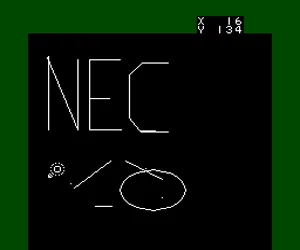
Getting Started: Since Artist Tool is a Japanese-only title, all menus and prompts are in Japanese. When the program boots, you will see a blank canvas or a tool palette. Use the D-Pad to move a cursor across the screen, and press the A button (X on keyboard) to select an option or begin drawing. The B button (S on keyboard) may serve as a cancel or eraser function. Experiment with different icons on the palette - these typically represent brush sizes, colors, and shape tools.
The core loop involves picking a tool from the menu, then drawing on the canvas by holding down the confirm button while moving the cursor. Some versions may allow you to switch between foreground and background colors. There is no score or win condition; the goal is simply to create pixel art. The interface relies heavily on symbols, so you can navigate by trial and error even without reading Japanese. Keep in mind that saving your work was not a standard feature on cartridge-based consoles, so drawings are lost when the system is turned off unless you photograph the screen.
CONTROLS
Controls
- Arrow Keys: D-Pad / Movement
- X: I button
- S: II button
- Enter: Run / Start
- V: Select
Artist Tool FAQ
Who developed Artist Tool?
The developer of Artist Tool is not widely documented in available sources. It was likely handled by a small team or a third-party publisher, but no studio is commonly credited for this title.
Is Artist Tool exclusive to NEC TURBOGRAFX-16 or did it appear on other systems?
Artist Tool is exclusive to the NEC TurboGrafx-16 (PC Engine) and was released only in Japan. It did not appear on any other platform.
What type of game is Artist Tool?
Artist Tool is a drawing and painting application, not a traditional game. It falls into the educational or creative software category, letting users create pixel art on the console.
You may also like
All NEC TURBOGRAFX-16 games











GAME INFO
- Platform
- NEC TURBOGRAFX-16
- Genre
- Educational
- Players
- 1
- Region
- Japan
COMMENTS (0)
No comments yet. Be the first to share your thoughts.