CHOOSE A VERSION
2 versions · same consoleChoose an original release, regional version, revision, bootleg or clearly labelled ROM hack/mod, then press Play. Hacks may change the gameplay. Switching versions restarts the player.
Selected: Default · USA · En,Fr,Es · USA
The game loads when you press Play · press “Play Now” inside the game if it asks.
Virtual Chess 64 (USA) (En,Fr,Es)
Virtual Chess 64
Getting to Know Virtual Chess 64
- Nintendo 64
- Board Game
- 5· 0 votes
Virtual Chess 64 is a chess simulation game released for the Nintendo 64. It was developed by a team known for creating chess games and was released in the late 1990s. This title falls under the strategy genre, catering to both casual players and chess enthusiasts alike, making it a notable entry in the N64 library.
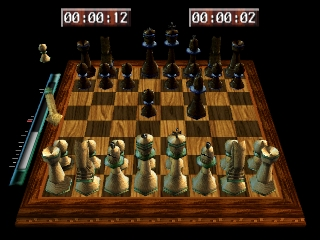
In Virtual Chess 64, players engage in chess matches against the computer or other players, utilizing a standard chessboard and pieces. The game features various difficulty levels, allowing players to choose a suitable challenge. Mechanics such as timed matches and hints for strategic moves enhance the gameplay experience, making it accessible for newcomers while providing depth for veterans.
What makes this game worth trying today is its straightforward approach to chess, which can be appreciated by both seasoned players and those looking to learn the game. Compared to other titles on the Nintendo 64, Virtual Chess 64 offers a unique blend of strategy and educational value, though it may not be as flashy or action-packed as other games from the era. Its simplicity and focus on chess make it a niche title that can still provide enjoyment for fans of board games and strategy.
GAME INFO
- Platform
- Nintendo 64
- Genre
- Board Game
- Publisher
- Titus Interactive
- Developer
- Titus Interactive
- Released
- 1997
- Players
- 1-2
- Region
- USA
How to play Virtual Chess 64 online
Getting started with Virtual Chess 64 involves selecting the game mode you wish to play, either against the AI or a friend. Once in the game, you'll be presented with a chessboard where you can move your pieces strategically based on the rules of chess. The core loop consists of taking turns to make your moves, with the goal of checkmating your opponent's king.
It's important to familiarize yourself with the controls and the chess pieces' movements to play effectively. As you progress, you can adjust the difficulty level or explore different match settings. Understanding basic chess strategies will enhance your experience, making each match more engaging and challenging.
CONTROLS
Controls
- Arrow Keys — D-Pad / Movement
- X — A button
- S — B button
- Z — Z trigger
- A — C-Down
- Q — L shoulder
- E — R shoulder
- Enter — Start
Virtual Chess 64 FAQ
Is Virtual Chess 64 exclusive to Nintendo 64 or did it appear on other systems?
This title is primarily known for its release on the Nintendo 64 and did not appear on other systems.
Does Virtual Chess 64 have a multiplayer or co-op mode?
The game allows for two players to compete against each other, making it a suitable option for local multiplayer matches.
Who developed Virtual Chess 64?
The specific development team behind Virtual Chess 64 is not widely documented, but it was created by a group experienced in making chess games.
You may also like
All Nintendo 64 games











GAME INFO
- Platform
- Nintendo 64
- Genre
- Board Game
- Publisher
- Titus Interactive
- Developer
- Titus Interactive
- Released
- 1997
- Players
- 1-2
- Region
- USA
COMMENTS (0)
No comments yet. Be the first to share your thoughts.