The game loads when you press Play · press “Play Now” inside the game if it asks.
Starline The Platypus 64
Starline The Platypus 64
Starline The Platypus 64 Overview
- Nintendo 64
- Platformer
- Homebrew
- 5· 0 votes
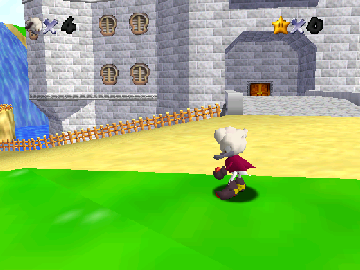
Starline The Platypus 64 is a homebrew platformer game for the Nintendo 64, developed by a small team of enthusiasts. This title is a part of the retro gaming community, where fans create new experiences on classic hardware. Released in a time when the N64 was known for its colorful graphics and engaging gameplay, Starline embraces those conventions while offering a unique twist with its titular character.
In Starline, players navigate through various levels filled with platforming challenges and enemies. The gameplay mechanics involve jumping, running, and collecting items, typical of platformers from this era. While specific details about power-ups or enemy types might be sparse, it’s clear that the game aims to capture the essence of classic 3D platforming while providing a fresh experience for players.
This title is worth checking out for those interested in the homebrew scene or fans of platformers looking for something a bit different. While it may not have the same level of polish or recognition as major N64 titles, it reflects the creativity and passion of retro gaming enthusiasts. Players who appreciate the charm of indie creations will find enjoyment in exploring what Starline The Platypus 64 has to offer.
GAME INFO
- Platform
- Nintendo 64
- Genre
- Platformer
How to play Starline The Platypus 64 online
Getting started in Starline The Platypus 64 involves familiarizing yourself with the controls and the game environment. Upon launching the game, you will be greeted with a menu, which may be in Japanese. Navigate through the options to start a new game and prepare to guide Starline through various levels filled with obstacles and enemies.
The core loop consists of exploring levels, jumping across platforms, and collecting items while avoiding hazards. As you progress, you’ll encounter increasingly challenging sections that will test your platforming skills. Pay attention to your surroundings, as timing your jumps and runs is crucial to overcoming obstacles and advancing through the game.
CONTROLS
Controls
- Arrow Keys — D-Pad / Movement
- X — A button
- S — B button
- Z — Z trigger
- A — C-Down
- Q — L shoulder
- E — R shoulder
- Enter — Start
Starline The Platypus 64 FAQ
Who developed Starline The Platypus 64?
The developer of Starline The Platypus 64 is not widely documented, but it is known to be a homebrew title created by a small team of enthusiasts.
Is Starline The Platypus 64 exclusive to Nintendo 64 or did it appear on other systems?
This game appears to be exclusive to the Nintendo 64, as it was developed specifically for this platform by the homebrew community.
What makes Starline The Platypus 64 stand out among Nintendo 64 titles of its era?
Starline The Platypus 64 stands out due to its status as a homebrew game, showcasing the creativity and dedication of retro gaming fans. It offers a unique experience that differs from mainstream titles of the time.
You may also like
All Nintendo 64 games











GAME INFO
- Platform
- Nintendo 64
- Genre
- Platformer
COMMENTS (0)
No comments yet. Be the first to share your thoughts.