CHOOSE A VERSION
2 versions · same consoleChoose an original release, regional version, revision, bootleg or clearly labelled ROM hack/mod, then press Play. Hacks may change the gameplay. Switching versions restarts the player.
Selected: Default · USA · USA
The game loads when you press Play · press “Play Now” inside the game if it asks.
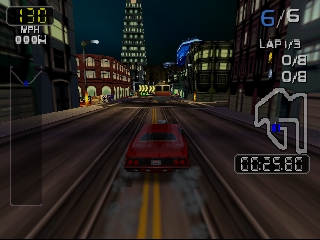
San Francisco Rush 2049 (USA)
San Francisco Rush 2049
About San Francisco Rush 2049
- Nintendo 64
- Racing
- 5· 0 votes
GAME INFO
- Platform
- Nintendo 64
- Genre
- Racing
- Publisher
- Midway Games
- Developer
- Atari Games
- Released
- 2000
- Players
- 1-2
- Region
- USA
How to play San Francisco Rush 2049 online
CONTROLS
Controls
- Arrow Keys — D-Pad / Movement
- X — A button
- S — B button
- Z — Z trigger
- A — C-Down
- Q — L shoulder
- E — R shoulder
- Enter — Start
San Francisco Rush 2049 FAQ
Which regions was San Francisco Rush 2049 released in?
The game was released in the USA, providing players with an engaging racing experience in a futuristic setting.
Does San Francisco Rush 2049 have a multiplayer or co-op mode?
Yes, the game includes multiplayer modes, allowing players to compete against each other, enhancing the fun and competitive nature of the racing experience.
Is San Francisco Rush 2049 exclusive to Nintendo 64 or did it appear on other systems?
While primarily known for its Nintendo 64 release, San Francisco Rush 2049 was also available in arcade form and on other platforms, including the Dreamcast.
You may also like
All Nintendo 64 games











GAME INFO
- Platform
- Nintendo 64
- Genre
- Racing
- Publisher
- Midway Games
- Developer
- Atari Games
- Released
- 2000
- Players
- 1-2
- Region
- USA
COMMENTS (0)
No comments yet. Be the first to share your thoughts.