CHOOSE A VERSION
5 versions · same consoleChoose an original release, regional version, revision, bootleg or clearly labelled ROM hack/mod, then press Play. Hacks may change the gameplay. Switching versions restarts the player.
Selected: Default · USA · USA
The game loads when you press Play · press “Play Now” inside the game if it asks.
Fighters Destiny (USA)
Fighters Destiny
Inside Fighters Destiny
- Nintendo 64
- Fighting
- 5· 0 votes
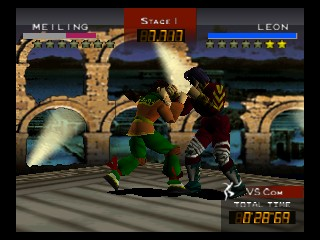
Fighters Destiny is a fighting game released in the USA for the Nintendo 64 in 1998. Developed by Genki and published by THQ, it features a unique blend of 3D fighting mechanics typical of the era. The game is known for its innovative gameplay that distinguishes it from other titles in the fighting genre on the platform.
In Fighters Destiny, players engage in one-on-one battles using a roster of diverse characters, each with their own unique fighting styles. The game incorporates a point system that rewards players for performing various moves, allowing for a strategic approach to combat. Players can also compete in a series of matches that culminate in a final showdown, making it essential to master each character's abilities and the game's mechanics to succeed.
What makes Fighters Destiny worth trying today is its unique point system and the blend of traditional fighting game mechanics with strategic elements. While it may not have the same level of recognition as titles like Super Smash Bros. or Mortal Kombat, it provides a different experience that can appeal to fans of the genre. The game serves as an interesting piece of retro gaming history, showcasing the experimentation that was prevalent in fighting games during the late 90s.
GAME INFO
- Platform
- Nintendo 64
- Genre
- Fighting
- Publisher
- Ocean Software
- Developer
- Genki
- Released
- 1998
- Players
- 1-2
- Region
- USA
How to play Fighters Destiny online
Getting started in Fighters Destiny involves selecting a character from the roster and choosing a game mode. Players can opt for single matches or enter a tournament to challenge multiple opponents. The core loop revolves around mastering the unique mechanics of each character while utilizing the point system to outsmart opponents in battles.
As you play, focus on learning the strengths and weaknesses of your chosen character. Timing and strategy are crucial, so practice combos and defensive maneuvers. Don’t hesitate to experiment with different characters to find the one that best suits your play style, as each offers a distinct set of moves and tactics.
CONTROLS
Controls
- Arrow Keys — D-Pad / Movement
- X — A button
- S — B button
- Z — Z trigger
- A — C-Down
- Q — L shoulder
- E — R shoulder
- Enter — Start
Fighters Destiny FAQ
Who developed Fighters Destiny?
Developed by Genki, Fighters Destiny was released for the Nintendo 64 in 1998 and showcases the studio's expertise in creating engaging fighting games.
Is Fighters Destiny an official release, a fan hack, a prototype, or another kind of build?
This game is an official release for the Nintendo 64, published by THQ in the USA, and not a hack or prototype.
Is Fighters Destiny exclusive to Nintendo 64 or did it appear on other systems?
Fighters Destiny is exclusive to the Nintendo 64 and did not see releases on other gaming platforms.
You may also like
All Nintendo 64 games











GAME INFO
- Platform
- Nintendo 64
- Genre
- Fighting
- Publisher
- Ocean Software
- Developer
- Genki
- Released
- 1998
- Players
- 1-2
- Region
- USA
COMMENTS (0)
No comments yet. Be the first to share your thoughts.