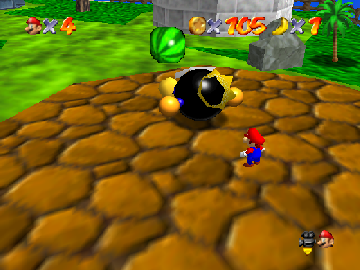
The game loads when you press Play · press “Play Now” inside the game if it asks.
DK's Adventure
DK's Adventure
Getting to Know DK's Adventure
- Nintendo 64
- Platformer
- Homebrew
- 5· 0 votes
DK's Adventure is a homebrew game for the Nintendo 64, created by fans of the franchise. It draws inspiration from classic platformers, utilizing familiar mechanics and aesthetics that defined the genre during the late 90s. While the exact details of its development and release are not widely documented, it captures the spirit of the era and showcases the creativity of the retro gaming community.
In this game, players navigate through various levels, overcoming obstacles and enemies typical of platformers. The mechanics are straightforward, focusing on jumping, running, and attacking, which fans of the genre will find familiar. The gameplay emphasizes exploration and skillful movement, rewarding players who master the controls and level design.
What makes DK's Adventure worth trying today is its nostalgic appeal and homage to the platforming genre. While it may not have the polish of commercial releases, it provides a unique experience for those interested in homebrew titles. It's a testament to the creativity of the retro gaming community, offering a glimpse into what fans can achieve with their passion for classic gaming.
GAME INFO
- Platform
- Nintendo 64
- Genre
- Platformer
How to play DK's Adventure online
Getting started in DK's Adventure involves familiarizing yourself with the controls and the gameplay loop. Begin by selecting a level from the main menu, which may be in Japanese, so navigation through options can be tricky. Once in a level, your goal is to traverse the environment, defeat enemies, and collect items while avoiding hazards.
As you play, focus on mastering your jumps and attacks to overcome the various challenges presented in each level. Timing is crucial, so practice your movements to avoid pitfalls and enemy attacks. The core loop revolves around exploration and skillful navigation, making it essential to learn the layout of each level for an optimal experience.
CONTROLS
Controls
- Arrow Keys — D-Pad / Movement
- X — A button
- S — B button
- Z — Z trigger
- A — C-Down
- Q — L shoulder
- E — R shoulder
- Enter — Start
DK's Adventure FAQ
What makes DK's Adventure stand out among Nintendo 64 titles of its era?
The game stands out due to its status as a homebrew title, reflecting the creativity of fans in the retro gaming community. It captures the essence of classic platformers while offering a unique experience that isn't commonly found in commercial releases.
Is there anything iconic or memorable about DK's Adventure?
While it may not have iconic status like other major Nintendo titles, DK's Adventure is memorable for its homage to the platforming genre and the effort put into its development by fans. It showcases the passion and dedication of the retro gaming community.
In what year was DK's Adventure originally released?
The release year for DK's Adventure is not widely documented, making it difficult to provide a specific date.
You may also like
All Nintendo 64 games











GAME INFO
- Platform
- Nintendo 64
- Genre
- Platformer
COMMENTS (0)
No comments yet. Be the first to share your thoughts.