CHOOSE A VERSION
3 versions · same consoleChoose an original release, regional version, revision, bootleg or clearly labelled ROM hack/mod, then press Play. Hacks may change the gameplay. Switching versions restarts the player.
Selected: Default · USA · USA
The game loads when you press Play · press “Play Now” inside the game if it asks.
Armorines - Project S.W.A.R.M. (USA)
Armorines - Project S.W.A.R.M.
Armorines - Project S.W.A.R.M.: N64 Run and Gun
- Nintendo 64
- Run and Gun
- 5· 0 votes
GAME INFO
- Platform
- Nintendo 64
- Genre
- Run and Gun
- Released
- 1999
- Players
- 1-2
- Region
- USA
How to play Armorines - Project S.W.A.R.M. online
CONTROLS
Controls
- Arrow Keys — D-Pad / Movement
- X — A button
- S — B button
- Z — Z trigger
- A — C-Down
- Q — L shoulder
- E — R shoulder
- Enter — Start
Armorines - Project S.W.A.R.M. FAQ
What type of game is Armorines - Project S.W.A.R.M.?
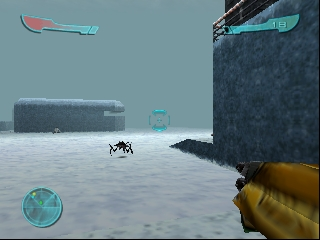
This game is a run-and-gun shooter that emphasizes fast-paced action and cooperative gameplay. Players battle against alien creatures using various weapons and tactics.
Is Armorines - Project S.W.A.R.M. exclusive to Nintendo 64 or did it appear on other systems?
Armorines - Project S.W.A.R.M. was primarily released for the Nintendo 64, with no widely documented appearances on other gaming systems. Its unique gameplay is closely tied to the experience on this console.
Is Armorines - Project S.W.A.R.M. considered easy to pick up or challenging?
The game presents a moderate challenge, making it accessible for newcomers while offering enough depth for seasoned players. Mastering the controls and understanding enemy patterns can take some practice, adding to its replayability.
You may also like
All Nintendo 64 games











GAME INFO
- Platform
- Nintendo 64
- Genre
- Run and Gun
- Released
- 1999
- Players
- 1-2
- Region
- USA
COMMENTS (0)
No comments yet. Be the first to share your thoughts.