The game loads when you press Play · press “Play Now” inside the game if it asks.
Woody Poco
Woody Poco
Woody Poco Overview
GAME INFO
How to play Woody Poco online
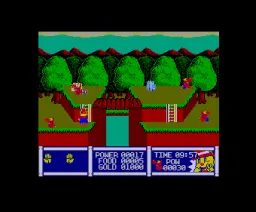
Begin by pressing Enter to start the game. At the title screen, use the D-Pad (Arrow Keys) to navigate any menu options and press X to confirm your selection - though menus are likely in Japanese, the flow is usually straightforward. Once in the actual game, use Arrow Keys to move your character. Press X to jump and S to attack or perform an action. The core gameplay involves moving through levels, avoiding hazards, and defeating enemies to reach the exit. Experimenting with buttons is key, as different games may assign functions slightly differently, but these mappings cover the standard MSX 2 action setup. If you get stuck, try using Select (V) to pause or change options.
CONTROLS
Controls
- Arrow Keys: D-Pad / Movement
- X: Trigger 1
- S: Trigger 2
- Enter: Start
Woody Poco FAQ
Is Woody Poco considered easy to pick up or challenging?
The difficulty of Woody Poco is not widely documented, so it's hard to say for certain. Many MSX 2 games of its era tend to be forgiving early on but can ramp up quickly, often requiring pattern memorization and precise jumps. Without direct play reports, it's safest to expect a moderate challenge typical of mid-80s computer action games.
Is Woody Poco exclusive to MSX 2 or did it appear on other systems?
All available evidence points to Woody Poco being exclusive to the MSX 2 system. No ports to other platforms have been confirmed, which is common for many niche MSX titles that never left their home computer ecosystem.
Can players save progress in Woody Poco?
No information exists about save functionality for Woody Poco. MSX 2 games from that period rarely included save features, relying instead on passwords or continuous play. If this game lacks either, you'll need to complete it in one session.












COMMENTS (0)
No comments yet. Be the first to share your thoughts.