The game loads when you press Play · press “Play Now” inside the game if it asks.
A.E.
A.E.
A.E. Overview
GAME INFO
- Platform
- MSX 1
- Genre
- Shooter
- Publisher
- Broderbund
- Released
- 1982
- Players
- 1
- Region
- Japan
How to play A.E. online
Getting Started
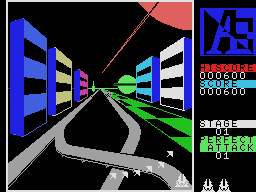
When you boot up A.E., you control a small ship at the bottom of the screen. The action is straightforward: use the arrow keys to move your ship left and right, and press the attack button (S or X depending on mapping) to fire at the waves of creatures that emerge from the background images. These enemies spawn from fixed points in the scenery, often appearing from behind objects, and they slowly scale up as they approach, creating a sense of depth.
The core loop is survive and score. Each wave of enemies gets tougher, and you must dodge their projectiles while picking them off. There's no power‑up system or complex strategy - it's pure reflex‑based shooting. The MSX version keeps the same two‑button feel as the original, so you won't need to learn any special moves. Just focus on aiming and staying alive.
If you're playing from a Japanese ROM, the menus and in‑game text are in English (the game was originally from the US), so there's no language barrier. Simply start the game and begin shooting. The challenge ramps quickly, so don't be discouraged by early deaths. Practice your timing and pattern recognition to push deeper into the game.
CONTROLS
Controls
- Arrow Keys: D-Pad / Movement
- X: Trigger 1
- S: Trigger 2
- Enter: Start
A.E. FAQ
What makes A.E. stand out among MSX 1 titles of its era?
A.E. was one of the first shooters to use detailed, painted‑style backgrounds instead of a plain starfield. Enemies emerge from within these scenes and slowly scale as they approach, giving the screen a surprising illusion of three‑dimensional depth. This visual twist made it feel more immersive than many other fixed‑screen shooters available on the MSX at the time.
Is A.E. exclusive to MSX 1 or did it appear on other systems?
A.E. originally launched on the Apple II and Atari 8‑bit computers in 1982, then saw ports to the VIC‑20 in 1983 and finally to the MSX 1 in 1984. It is not an MSX exclusive, but the MSX version is a faithful port that preserves the unique background art and gameplay of the earlier releases.
Which regions was A.E. released in?
The original Apple II and Atari 8‑bit versions were released in North America by Broderbund. The MSX port was distributed in Japan, where the MSX platform was most popular. There is no documented release of the MSX version in Europe or other regions.
You may also like
All MSX 1 games











GAME INFO
- Platform
- MSX 1
- Genre
- Shooter
- Publisher
- Broderbund
- Released
- 1982
- Players
- 1
- Region
- Japan
COMMENTS (0)
No comments yet. Be the first to share your thoughts.