The game loads when you press Play · press “Play Now” inside the game if it asks.
Smash Ping Pong (Japan)
Smash Ping Pong
About Smash Ping Pong
- Famicom Disk System
- Sports
- 5· 0 votes
GAME INFO
- Platform
- Famicom Disk System
- Genre
- Sports
- Publisher
- Nintendo
- Developer
- Konami
- Released
- 1985
- Players
- 1-2
- Region
- Japan
How to play Smash Ping Pong online
Getting Started
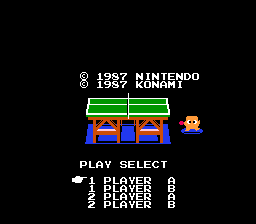
When you boot up Smash Ping Pong, you'll see a title screen in Japanese. Press Start on the title screen to proceed. The menu likely offers single-player versus the computer or a two-player mode. Since the text is Japanese, look for the option that has a number "2" or two paddles to find the multiplayer mode. The single-player option will start a match against an AI opponent.
The core loop is simple: serve the ball by pressing a button (try the A or B key), then use the D-Pad to move your paddle left and right. Time your swing by pressing the A or B button to hit the ball back. The game uses basic physics - you can add spin by pressing the button with a directional input, though the exact timing takes practice. Rallies end when you miss or the opponent fails to return. There is no power meter or special moves; just clean, old-school ping pong.
If you are new to FDS games, remember that the disk system requires a short load time after the title screen. Be patient. Once the match starts, the controls are responsive. There is no pause function visible in the retro emulation, but pressing Enter (Start) might pause the action. Experiment carefully, and enjoy the simplicity of early sports gaming.
CONTROLS
Controls
- Arrow Keys: D-Pad / Movement
- X: A button (jump / confirm)
- S: B button (run / attack / cancel)
- Enter: Start / Pause
- V: Select
Smash Ping Pong FAQ
Who developed Smash Ping Pong?
The development studio behind Smash Ping Pong is not widely documented. It was released for the Famicom Disk System in Japan, but no credible source attributes it to a known developer. Many FDS sports titles from this period lack clear developer credits.
Is Smash Ping Pong exclusive to Famicom Disk System or did it appear on other systems?
Smash Ping Pong was released exclusively for the Famicom Disk System in Japan. There are no known ports to other platforms, including cartridge or international releases. It remains a Japan-exclusive FDS title.
What makes Smash Ping Pong stand out among Famicom Disk System titles of its era?
It stands out as a straightforward table tennis simulation on a platform more famous for adventure and action games. The disk format allowed faster loading than cartridges, but the gameplay is simple and unadorned. For collectors, it represents the breadth of sports software available on the FDS.
You may also like
All Famicom Disk System games Aki to Tsukasa no Fushigi no Kabe
 Yume Koujou - Doki Doki Panic
 Bishoujo Hanafuda Club Vol.2 - Koikoi Bakappana Hen
 Bishoujo Shashinkan - Studio Cut
 Bishoujo Sexy Slot
 Bishoujo Hanafuda Club Vol.1 - Oichokabu Hen
 Transformers - The Headmasters
 Bakutoushi Patton-kun
 Aliens - Alien 2
 Tenshitachi no Houkago
 Backgammon
 Chitei Tairiku Ordola
GAME INFO
- Platform
- Famicom Disk System
- Genre
- Sports
- Publisher
- Nintendo
- Developer
- Konami
- Released
- 1985
- Players
- 1-2
- Region
- Japan
COMMENTS (0)
No comments yet. Be the first to share your thoughts.