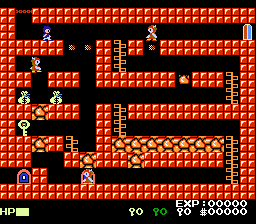
The game loads when you press Play · press “Play Now” inside the game if it asks.
Lutter (Japan) (Disk Writer)
Lutter
About Lutter
- Famicom Disk System
- Action
- 5· 0 votes
GAME INFO
- Platform
- Famicom Disk System
- Genre
- Action
- Publisher
- Athena
- Developer
- Athena
- Released
- 1989
- Region
- Japan
How to play Lutter online
CONTROLS
Controls
- Arrow Keys: D-Pad / Movement
- X: A button (jump / confirm)
- S: B button (run / attack / cancel)
- Enter: Start / Pause
- V: Select
Lutter FAQ
Who developed Lutter?
The developer of Lutter is not widely documented in known gaming databases or catalogs. It was likely handled by a small studio under contract with Nintendo, as was common for Disk Writer titles, but no specific name has been confirmed.
Is Lutter exclusive to Famicom Disk System or did it appear on other systems?
Lutter appears to be exclusive to the Famicom Disk System's Disk Writer service. No evidence suggests it was ported to cartridges or other platforms, which was typical for Disk Writer releases.
In what year was Lutter originally released?
The exact release year for Lutter is not widely recorded. Disk Writer titles were introduced in February 1986 and received periodic updates, so Lutter likely debuted between 1986 and 1988, but no precise date has been preserved.
You may also like
All Famicom Disk System games Aki to Tsukasa no Fushigi no Kabe
 Yume Koujou - Doki Doki Panic
 Bishoujo Hanafuda Club Vol.2 - Koikoi Bakappana Hen
 Bishoujo Shashinkan - Studio Cut
 Bishoujo Sexy Slot
 Bishoujo Hanafuda Club Vol.1 - Oichokabu Hen
 Transformers - The Headmasters
 Bakutoushi Patton-kun
 Aliens - Alien 2
 Tenshitachi no Houkago
 Backgammon
 Chitei Tairiku Ordola
GAME INFO
- Platform
- Famicom Disk System
- Genre
- Action
- Publisher
- Athena
- Developer
- Athena
- Released
- 1989
- Region
- Japan
COMMENTS (0)
No comments yet. Be the first to share your thoughts.