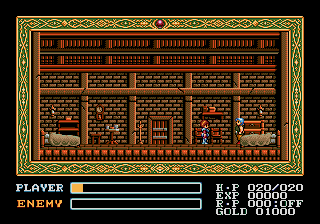
Ys - Wanderers from Ys (Japan)
Ys - Wanderers from Ys (Japan): Genesis Action
Ys - Wanderers from Ys is the Japanese Mega Drive port of Ys III: Wanderers from Ys, an action role-playing game originally developed by Nihon Falcom. It landed on SEGA's 16-bit console in 1991 exclusively in Japan, bringing the series' fast-paced combat to a new audience. This version is notable for being the only official Ys release on the Genesis hardware in that region, though Western players later saw the game on other platforms.
How to Play Ys - Wanderers from Ys (Japan) Online
Getting Started
Since this is a Japanese import, all menus and dialogue are in Japanese. Start by pressing Start to begin a new game. You take control of Adol Christin in the town of Redmont. Move with the D-Pad, press the A button (X key on keyboard) to jump and confirm selections, and use the B button (S key) to run and attack or cancel. The core loop involves talking to townspeople for hints and then venturing into side-scrolling stages.
Combat uses the series' signature bump system: run directly into enemies to damage them. Hitting them from the front will push you back, but attacking from the side or back deals damage. You can equip weapons, armor, and accessories found in shops or treasure chests. Leveling up automatically increases your attack power and hit points. Pay attention to the on-screen icons for health and magic. Save your progress by finding a priest in town.
As a Genesis title, the controls are responsive but the language barrier might require trial and error. Experiment with the Y and X buttons (Z and A on keyboard) for items and magic use. Keep an eye on your stamina gauge, which depletes when running; stopping lets it recover. The game is short by RPG standards, but the bump combat takes practice to master efficiently.
Ys - Wanderers from Ys (Japan) Keyboard Controls
Controls
- Arrow Keys: D-Pad / Movement
- X: A button
- S: B button
- Z: C button
- A: X button (6-button pad)
- Q: Y button (6-button pad)
- E: Z button (6-button pad)
- Enter: Start / Mode




Comments (0)