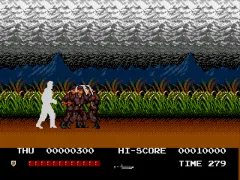
Thunder Fox (Japan)
Thunder Fox (Japan) on Genesis
Thunder Fox is a run and gun game that Taito originally dropped into arcades back in 1990, then brought to the Mega Drive (Genesis) in 1991 exclusively in Japan. That means the cartridge you'd see is entirely in Japanese, but the core action is still easy to follow. It's a side-scrolling shooter where you run forward and blast everything that moves, typical of the late-80s/early-90s arcade scene.
How to Play Thunder Fox (Japan) Online
Getting Started
When you boot Thunder Fox, you'll see a title screen in Japanese. The menu options are likely "1 Player" and "2 Players" (cooperative). Press Start (Enter) to begin. You control a commando-style soldier who can run and shoot in eight directions. The goal is to advance through each stage, taking out enemy soldiers, turrets, and vehicles.
The core loop is simple: run right, shoot everything, and avoid taking hits. You can jump over obstacles and some enemy fire. You'll find power-ups like speed boosts and spread shots along the way. The game is pretty straightforward - just keep moving and shooting. Losing all your lives returns you to the title screen, so memorizing enemy placements helps.
Because the menus are in Japanese, you might need to experiment to find options like difficulty or sound test. The start button kicks off the action, and the B button fires your weapon. If you get confused, look for the typical arcade layout: start to begin, shoot to play.
Thunder Fox (Japan) Keyboard Controls
Controls
- Arrow Keys: D-Pad / Movement
- X: A button
- S: B button
- Z: C button
- A: X button (6-button pad)
- Q: Y button (6-button pad)
- E: Z button (6-button pad)
- Enter: Start / Mode
![Metal Slug 5 Plus (bootleg) [Bootleg]](/images/default-game-thumb.webp)
Comments (0)