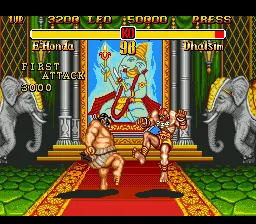
Super Street Fighter II - The New Challengers (Japan)
What is Super Street Fighter II - The New Challengers (Japan)?
Super Street Fighter II - The New Challengers hit the SEGA Genesis in 1994, specifically for the Japanese Mega Drive market. This is Capcom's fourth iteration of their legendary fighting franchise, known for adding four fresh fighters - Cammy, Dee Jay, T. Hawk, and Fei Long - alongside a host of balance tweaks and visual/sound upgrades. If you grew up on the original Street Fighter II, this was the version that seriously shook up the roster and playstyle.
How to Play Super Street Fighter II - The New Challengers (Japan) Online
The first thing you'll see is the title screen, then a menu in Japanese. Press Start to move past the attract mode; you'll land on a mode select screen. The top option is usually Arcade Mode (the single-player tournament), and the second is Versus Mode for two players. Use the D-Pad to highlight and the A button (X key) to confirm.
Your core loop in Arcade Mode: pick a character from the eight original world warriors plus the four new challengers, then fight through a series of computer opponents. Each match is a best-of-three rounds. Land punches, kicks, and special moves (like fireballs and dragon punches) to drain the opponent's health bar. Win the final match against the boss (M. Bison) to see your character's ending.
New players should know that this version tightens the gameplay compared to older Street Fighter II editions - combos are more reliable, and the new characters bring unique strategies. Since the menu text is in Japanese, memorize the menu layout: after the title screen, the first menu has Arcade (top), Versus (middle), and sometimes Options (bottom). Experiment in versus mode to get a feel for moves before diving into the tournament.
Super Street Fighter II - The New Challengers (Japan) Keyboard Controls
Controls
- Arrow Keys: D-Pad / Movement
- X: A button
- S: B button
- Z: C button
- A: X button (6-button pad)
- Q: Y button (6-button pad)
- E: Z button (6-button pad)
- Enter: Start / Mode
Comments (0)