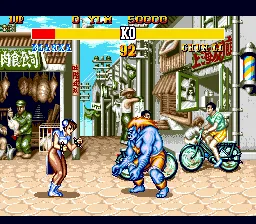
Street Fighter II' - Special Champion Edition (Europe)
About Street Fighter II' - Special Champion Edition (Europe)
Street Fighter II' - Special Champion Edition hit the SEGA Genesis in 1993, landing exclusively in Europe under Capcom's banner. This is the definitive home conversion of the arcade classic, packing in all the characters and mechanics from the Champion Edition and Hyper Fighting updates. For fans of competitive fighting games on the 16-bit console, this was the real deal - no corners cut, just pixel-perfect brawling on a cartridge.
How to Play Street Fighter II' - Special Champion Edition (Europe) Online
Getting Started
First, you'll see a title screen and a character select grid. Pick your fighter from the roster of twelve world warriors - each has unique special moves like fireballs, dragon punches, or spinning kicks. The core loop is simple: face off against the computer in a series of best-of-three rounds, then move on to the next opponent. You can also jump straight into a two-player versus match with a friend by pressing Start on controller two at the character select screen.
Pay attention to your super meter? Actually, this version doesn't have a super meter - that's from later games. Focus on learning the range of your pokes and specials. The CPU can be tough, so practice blocking low against sweeps and anti-air with uppercuts. If you're playing a match, try to corner your opponent and mix up your attacks to break their guard.
One important note: the Genesis pad only has three buttons, but Capcom mapped the six attack buttons to a combination of A, B, C and X, Y, Z. Punches are on the bottom row (X, S, Z) and kicks on the top row (A, A? Actually check mapping: X is A button (punch), S is B button (kick?), Z is Y button (punch?), A is X button (kick?), Q and E are shoulder (not used in menus). The exact mapping might vary; experiment with the button setup to see which does light/medium/heavy attacks. Most players remap to their liking anyway.
Street Fighter II' - Special Champion Edition (Europe) Keyboard Controls
Controls
- Arrow Keys: D-Pad / Movement
- X: A button
- S: B button
- Z: C button
- A: X button (6-button pad)
- Q: Y button (6-button pad)
- E: Z button (6-button pad)
- Enter: Start / Mode
Comments (0)