Ryuuko no Ken (Japan)
Ryuuko no Ken (Japan) Overview
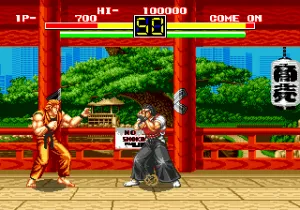
Ryuuko no Ken is the Japanese SEGA Genesis port of SNK's classic fighting game Art of Fighting. It arrived on the 16-bit console in 1993, a couple of years after the Neo Geo original hit arcades. This version faithfully brings over SNK's distinct approach to the genre, emphasizing large sprite art and a super gauge system that rewards aggressive play. If you've played the arcade version, you'll recognize the same roster and mechanics here, though the Genesis hardware imposes some compromises in color and animation.
How to Play Ryuuko no Ken (Japan) Online
Getting started
When you boot up Ryuuko no Ken, you'll see a title screen in Japanese. Press Start to enter the main menu, where you can choose between single-player modes like Story or Versus. The menus are simple - use the D-Pad to highlight options and the A button to confirm. In Story mode you pick a fighter and battle through a series of opponents, each with their own fighting style and special moves.
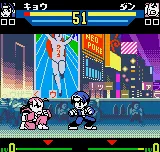
Matches are standard one-on-one bouts with a time limit. Your goal is to deplete the opponent's health bar before yours runs out. The super gauge at the bottom of the screen fills as you land hits or take damage. Once it's full, you can execute a super move by pressing a specific directional input plus an attack button. Learning these inputs takes practice, but they are the key to turning the tide in tougher fights.
If you're new to the game, start with the easier characters like Robert or King. Spend time in training mode (if available) to get the timing down for special moves and the super gauge. Blocking is essential - hold back on the D-Pad to block high, and down-back for low attacks. The AI can be punishing, so don't rush in blindly.
Ryuuko no Ken (Japan) Keyboard Controls
Controls
- Arrow Keys: D-Pad / Movement
- X: A button
- S: B button
- Z: C button
- A: X button (6-button pad)
- Q: Y button (6-button pad)
- E: Z button (6-button pad)
- Enter: Start / Mode
Comments (0)