The game loads when you press Play · press “Play Now” inside the game if it asks.
Rise of the Robots (Europe)
Rise of the Robots
What is Rise of the Robots?
- SEGA Genesis
- Fighting
- 5· 0 votes
GAME INFO
- Platform
- SEGA Genesis
- Genre
- Fighting
- Publisher
- Atari Games
- Released
- 1994
- Players
- 1
- Region
- Europe
How to play Rise of the Robots online
Getting Started
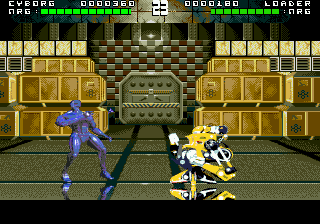
After loading the game, you'll see a title screen. Press the Start key to proceed to the main menu where you can select a single-player fight. Choose your difficulty or simply start the battle. The game immediately throws you into a one-on-one fight with a robot opponent.
Your goal is to deplete the enemy's health bar using basic punches and kicks. Block incoming attacks by holding back on the D-Pad. Each victory moves you to the next opponent. There is no save feature, so you must complete the game in one sitting or start over. The fights follow a fixed order with no branching paths.
The core loop is repetitive: attack, block, counter. The enemies do not adapt as promised, so you can memorize their patterns to win. Mastering the timing of your strikes is key to progressing through the short roster of robot foes.
CONTROLS
Controls
- Arrow Keys: D-Pad / Movement
- X: A button
- S: B button
- Z: C button
- A: X button (6-button pad)
- Q: Y button (6-button pad)
- E: Z button (6-button pad)
- Enter: Start / Mode
Rise of the Robots FAQ
Can players save progress in Rise of the Robots?
The game does not include a battery backup or password system. Progress cannot be saved; each session starts from the beginning.
In what year was Rise of the Robots originally released?
The original release year is 1994 across multiple platforms including the SEGA Genesis in Europe.
Is there anything iconic or memorable about Rise of the Robots?
Its infamous promise of adaptive enemy AI became a cautionary tale in gaming. The game's heavy hype and subsequent failure to deliver are more memorable than the actual gameplay.
You may also like
All SEGA Genesis games











GAME INFO
- Platform
- SEGA Genesis
- Genre
- Fighting
- Publisher
- Atari Games
- Released
- 1994
- Players
- 1
- Region
- Europe
COMMENTS (0)
No comments yet. Be the first to share your thoughts.