Ranger-X (Europe)
About Ranger-X (Europe)
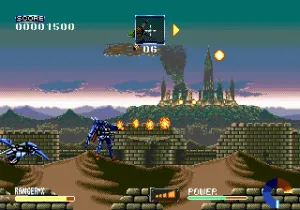
Ranger-X hit the SEGA Genesis in Europe back in 1993, a port of UPL's Japanese arcade-style run and gun Ex-Ranza. It's a straightforward side-scrolling shooter where you pilot a yellow mech called Ranger-X, tasked with repelling the Edgezone terrorist invasion of the Homeworld. The European version kept the same frantic action but changed the title and some minor presentation details, making it a distinct regional release.
You guide Ranger-X across a series of horizontally scrolling stages, gunning down waves of enemy soldiers, tanks, and flying drones. The mech can shoot straight ahead or angle its shots upward, and you have a limited-use charge attack that fires a powerful beam. A hovering drone follows your movement and can be detached to attack independently, adding a layer of tactical depth. The core loop is straightforward: move, shoot, collect power-ups, avoid damage, and survive the onslaught until you reach the stage boss.
Ranger-X is worth revisiting today for its pure, unapologetic difficulty. It doesn't hold your hand, demanding quick reflexes and pattern memorization. The pixel art is detailed and the soundtrack hums with that classic Genesis energy. It's a solid example of the early '90s run and gun genre, perfect for players who enjoy a stiff challenge and prefer their action games stripped of fluff.
How to Play Ranger-X (Europe) Online
Start by pressing Enter at the title screen. The game immediately throws you into the first stage with no menu. Use the D-Pad to move Ranger-X left or right, jump on platforms, and dodge enemy fire. Press S to fire your standard weapon; hold S to charge a more powerful shot. The drone (Z or Y button) can be launched as a separate turret. Pay attention to the weapon power-ups dropped by enemies - they increase your fire rate and damage. The game has no continues, so every life counts. Memorize enemy patterns and use the charge attack wisely against bosses.
Ranger-X (Europe) Keyboard Controls
Controls
- Arrow Keys: D-Pad / Movement
- X: A button
- S: B button
- Z: C button
- A: X button (6-button pad)
- Q: Y button (6-button pad)
- E: Z button (6-button pad)
- Enter: Start / Mode

![Metal Slug 5 Plus (bootleg) [Bootleg]](/images/default-game-thumb.webp)
Comments (0)