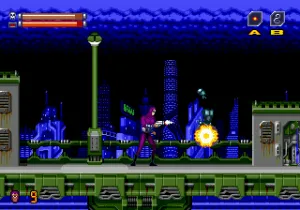
Phantom 2040 (Europe)
Phantom 2040 (Europe): Genesis Action
You travel through ruined cities and enemy strongholds, using the Phantom's agility and combat skills to take down foes. The gameplay is a mix of side-scrolling running and gunning with platforming sections. You'll jump over pits, climb ledges, and shoot at various enemies that stand in your way. The core loop involves navigating each level, gathering items, and defeating a boss at the end to progress.
What makes Phantom 2040 worth checking out today is its direct connection to the cartoon, which had a distinctive look and feel. It's not the deepest action game on the Genesis, but it captures the grim tone of its source material. If you enjoyed the series or just want a solid run-and-gun from the mid-90s, this European release is a decent pick for a quick playthrough.
How to Play Phantom 2040 (Europe) Online
When you start the game, you'll see a title screen that leads into the first level. Use the arrow keys to move your character left or right, and press X to jump over obstacles or onto platforms. Press S to attack enemies with the Phantom's gun or a melee strike. The A and Z buttons trigger alternate weapon actions if you've picked up special items, but they are not essential for basic progress.
The core objective is to clear each stage by defeating all enemies and reaching the boss at the end. You have a health bar that depletes when hit, and collecting green orbs restores some of it. Watch for ammunition pickups for your ranged attack. The game is straightforward - keep moving forward, shoot anything hostile, and use platforms to reach higher areas. If you get a game over, you can continue from the same level, though lives are limited. The password system in the original cartridge isn't emulated here, so just restart if you want to try again.
Phantom 2040 (Europe) Keyboard Controls
Controls
- Arrow Keys: D-Pad / Movement
- X: A button
- S: B button
- Z: C button
- A: X button (6-button pad)
- Q: Y button (6-button pad)
- E: Z button (6-button pad)
- Enter: Start / Mode




Comments (0)