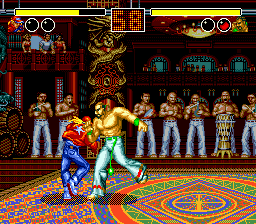
Garou Densetsu - Shukumei no Tatakai (Japan)
Garou Densetsu - Shukumei no Tatakai (Japan) on Genesis
Garou Densetsu - Shukumei no Tatakai is the Japanese title for the SEGA Genesis port of SNK's first fighting game, Fatal Fury. Originally released on the Neo Geo in 1991, this version arrived in Japan on the Genesis in 1992. It is a direct conversion of the arcade hit, introducing players to characters like Terry and Andy Bogard, Joe Higashi, and the villainous Geese Howard.
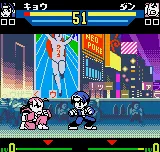
As a 2D one-on-one fighter, players select a character and battle opponents in rounds. The key mechanic is the two-plane system, letting fighters dodge attacks by switching between the foreground and background. Each character has unique special moves, and matches are best two out of three rounds. The goal is to defeat all opponents and become the champion.
This Genesis port offers a solid, if slightly stripped-down, experience of the original. While not as visually sharp as the Neo Geo version, it captures the essence of early SNK fighters and is a must-try for fans of the genre. Its historical significance as the foundation of the Fatal Fury and King of Fighters series makes it worth revisiting, even if it feels dated by modern standards.
How to Play Garou Densetsu - Shukumei no Tatakai (Japan) Online
After the title screen, press Enter to start. The menus are in Japanese, but the layout is straightforward. Use the D-Pad to navigate and press X to confirm selection. First, choose between Single Player and VS mode. Then pick a character from the roster using the D-Pad and confirm with X.
The core loop involves fighting through a series of opponents in tournament style. Each match is a best-of-three round battle. The two-plane mechanic means you can dodge attacks by pressing Up or Down to switch between the foreground and background. Learn each character's special moves (usually quarter-circle motions plus a button) to overcome tougher foes. The game does not save, so each session is a fresh run.
Garou Densetsu - Shukumei no Tatakai (Japan) Keyboard Controls
Controls
- Arrow Keys: D-Pad / Movement
- X: A button
- S: B button
- Z: C button
- A: X button (6-button pad)
- Q: Y button (6-button pad)
- E: Z button (6-button pad)
- Enter: Start / Mode
Comments (0)