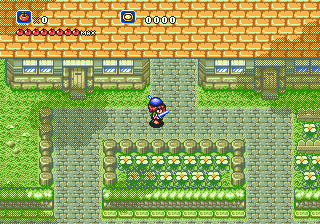
Crusader of Centy (USA)
Crusader of Centy (USA) Overview
Crusader of Centy is an action role-playing game for the Sega Genesis, often remembered as one of the few Zelda clones on the system. It was released in North America under this title, while in Japan it is known as Shin Sousei Ragnacenty and in Europe as Soleil. The game stands out for its unique take on enemy design, portraying creatures as sympathetic beings rather than mindless evil drones.
You control a young hero who must explore a top-down overworld, enter dungeons, and battle foes. The key mechanic is befriending animal pals that accompany you and grant special abilities, such as attacking or solving puzzles. The core loop involves talking to villagers, acquiring items, and navigating through labyrinthine areas, much like The Legend of Zelda. Combat is real-time, and the animal buddies can be swapped for different situations.
For retro gaming enthusiasts, Crusader of Centy offers a charming alternative to the Zelda formula with a more gentle tone. It is not as polished or expansive as Nintendo's classic, but its animal companion system and empathetic enemies give it a distinct personality. It is a worthwhile playthrough for anyone curious about lesser-known Genesis RPGs, especially if you appreciate games that avoid black-and-white morality.
How to Play Crusader of Centy (USA) Online
You start in the town of Corona. Speak to the townspeople, collect your first sword, and then head east to the first cave. The game encourages experimentation with animal buddies - you'll find them in hidden spots or after helping NPCs. Each animal gives you a new attack or ability, like the dog that digs or the hawk that flies over gaps.
Your main goal is to collect six crystals to defeat the final boss, but the story focuses on understanding the monsters rather than just killing them. You can avoid many fights by talking, and some puzzles require you to use the right animal. Save your progress at the many save points scattered throughout the world.
Crusader of Centy (USA) Keyboard Controls
Controls
- Arrow Keys: D-Pad / Movement
- X: A button
- S: B button
- Z: C button
- A: X button (6-button pad)
- Q: Y button (6-button pad)
- E: Z button (6-button pad)
- Enter: Start / Mode





Comments (0)