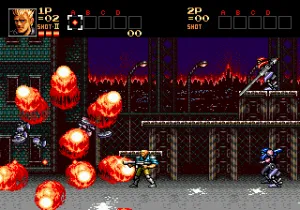
Contra - The Hard Corps (Japan)
Contra - The Hard Corps (Japan) Overview
Players choose from four characters each with a unique weapon loadout and special attack. The game plays as a side-scrolling shooter where you run, jump, and blast through waves of enemies across varied stages. Branching paths and dialogue choices lead to multiple endings, giving the game replay value. Cooperative play with a friend is fully supported, doubling the chaos on screen.
This title stands out for its intense difficulty, fast-paced action, and a branching story structure that was ahead of its time for the genre. It remains a fan favorite among Genesis shooters and is often praised for its tight controls and memorable boss fights. If you enjoy classic run-and-gun games like Gunstar Heroes or the earlier Contra titles, this is one to try.
How to Play Contra - The Hard Corps (Japan) Online
Getting Started
When you start the game, you will see a title screen. Press Start to proceed to the character select screen. Use the D-Pad to choose from four characters: Ray Poward, Sheena Etranzi, Brad Fang, or Browny, each with a different primary weapon and special attack. Press the B button (S key) to confirm your choice.
The core gameplay loop is straightforward: move right through each stage, shooting enemies while avoiding their attacks. You can pick up weapon power-ups dropped by enemies or found in capsules. The game has branching paths, so occasionally you will reach a point where you must choose a direction or answer a character's question. These choices affect which stages you play and which ending you get.
Because this is the Japanese version, all menus and dialogue are in Japanese. However, the controls and gameplay are identical to the Western version. If you get stuck, try experimenting with weapon pickups and remember that you can slide by pressing down + jump. Dying sends you back to a checkpoint, but you can continue by pressing Start when the continue prompt appears.
Contra - The Hard Corps (Japan) Keyboard Controls
Controls
- Arrow Keys: D-Pad / Movement
- X: A button
- S: B button
- Z: C button
- A: X button (6-button pad)
- Q: Y button (6-button pad)
- E: Z button (6-button pad)
- Enter: Start / Mode

![Metal Slug 5 Plus (bootleg) [Bootleg]](/images/default-game-thumb.webp)
Comments (0)