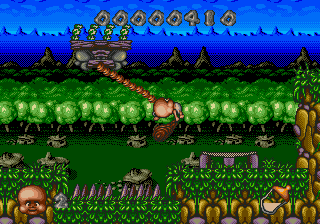
Chuck Rock II - Son of Chuck (USA) (Beta)
Chuck Rock II - Son of Chuck (USA) (Beta) Overview
Chuck Rock II - Son of Chuck (USA) (Beta) is a side-scrolling action game for the SEGA Genesis, found here as a pre-release build. The cartridge was originally developed as the sequel to the 1991 hit Chuck Rock, though this specific beta version likely predates the final retail release. Since it's a beta, some content may differ from the finished product, and the publisher or developer details for this build aren't widely documented. The trusted summary confirms the core premise: you control the son of Chuck Rock as he battles dinosaurs to rescue his parents.
How to Play Chuck Rock II - Son of Chuck (USA) (Beta) Online
Getting Started
When you start the game, you take control of the young caveman, Chuck Jr. Your immediate goal is to move right through each stage, fighting off dinosaurs and other prehistoric creatures. Tap the B button (S key) to swing your club or perform an attack, and use the D-Pad to jump over obstacles or onto platforms. The A button (X key) lets you jump, which you'll need to reach higher areas and avoid enemies.
The core loop is simple: explore each side-scrolling level, defeat any hostile creatures you encounter, and collect items or power-ups that might help you progress. Look for keys, doors, or special objects that advance the level. The beta build may have unfinished areas or placeholder graphics, so expect some rough edges. If you get stuck, try exploring every path - some dinosaurs can be avoided rather than fought.
Pay attention to your health bar; contact with enemies or hazards reduces it. There are no continues documented in this build, so a single life loss sends you back to the start. This is a typical action-platformer rhythm where careful movement and timing are key.
Chuck Rock II - Son of Chuck (USA) (Beta) Keyboard Controls
Controls
- Arrow Keys: D-Pad / Movement
- X: A button
- S: B button
- Z: C button
- A: X button (6-button pad)
- Q: Y button (6-button pad)
- E: Z button (6-button pad)
- Enter: Start / Mode




Comments (0)