The game loads when you press Play · press “Play Now” inside the game if it asks.
Sol-Feace
Sol-Feace
Getting to Know Sol-Feace
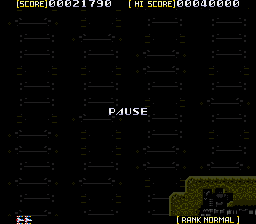
Sol-Feace is a horizontally scrolling shooter originally released for the X68000 computer in 1990 by Wolf Team and Telenet Japan. It later made its way to the Sega CD, offering enhanced audio and visuals while keeping the core arcade-style action intact. This version brings the fast-paced shooting to a wider audience.
As the pilot of the Sol-Feace starship, you fly through relentless enemy formations, blasting away with your ship's cannons while dodging a constant stream of projectiles. Power capsules dropped by destroyed enemies upgrade your weapons, and the dual cannons can fire diagonal shots to catch foes from tricky angles. The goal is to push through each stage and ultimately shut down a malfunctioning supercomputer that threatens humanity.
Today Sol-Feace holds up as a solid example of early 90s shoot-'em-up design, especially for Sega CD owners looking for a straightforward, challenging experience. It doesn't reinvent the genre but delivers crisp controls, a fitting soundtrack, and satisfying action that fans of games like Gradius or R-Type will appreciate. If you enjoy classic horizontal shooters, this is worth a playthrough.
GAME INFO
- Platform
- SEGA CD
- Genre
- Shooter
- Publisher
- Telenet Japan
- Developer
- Namco Tales Studio
- Released
- 1990
- Players
- 1
How to play Sol-Feace online
Press Start to begin a new game. Your ship moves with the D-Pad and fires with the B button (S key). Collect colored power capsules dropped by enemies to upgrade your weapons - these enhance firepower, speed, or add spread shots. Watch for enemy bullets and obstacles; the game scrolls automatically from left to right. Each stage ends with a boss that requires pattern memorization to defeat.
The core loop is straightforward: survive waves of enemies, grab power-ups, and reach the end of each stage. If you are playing the Japanese version, menus will appear in Japanese, but the options are few - typically just "Start," "Option," and "Sound Test." The gameplay is entirely action-oriented, so language is not a barrier. Focus on dodging and aiming your diagonal shots to handle enemies above and below.
CONTROLS
Controls
- Arrow Keys: D-Pad / Movement
- X: A button
- S: B button
- Z: C button
- A: X button (6-button pad)
- Q: Y button (6-button pad)
- E: Z button (6-button pad)
- Enter: Start / Mode
Sol-Feace FAQ
Which regions was Sol-Feace released in?
Sol-Feace originally launched on the X68000 in Japan, then saw a Sega CD release in Japan as well. An American release came under the renamed Sol-Deace for the Sega Genesis.
Is Sol-Feace considered easy to pick up or challenging?
The game offers a moderate learning curve. New players can grasp the basics quickly, but later stages demand precise dodging and weapon management, making it fairly challenging for genre veterans.
Is Sol-Feace exclusive to SEGA CD or did it appear on other systems?
Sol-Feace first appeared on the Sharp X68000 computer in 1990. It was later ported to both the Sega CD and Sega Genesis, where the Genesis version was retitled Sol-Deace.
You may also like
All SEGA CD games
GAME INFO
- Platform
- SEGA CD
- Genre
- Shooter
- Publisher
- Telenet Japan
- Developer
- Namco Tales Studio
- Released
- 1990
- Players
- 1
COMMENTS (0)
No comments yet. Be the first to share your thoughts.