The game loads when you press Play · press “Play Now” inside the game if it asks.
Demolition Man
Demolition Man
What is Demolition Man?
- SEGA CD
- Run and Gun
- 5· 0 votes
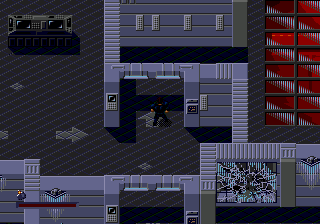
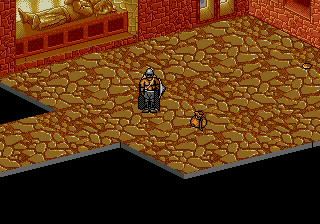
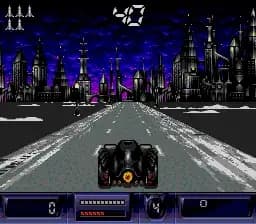
The player controls John Spartan as he moves through levels blasting enemies, jumping over obstacles, and collecting weapons to take down Simon Phoenix. The Sega CD version includes some additional cutscenes and CD-quality audio that the cartridge versions lacked, but the mechanics stay faithful to the run-and-gun template: you run right, shoot everything in sight, and occasionally face a boss. There are no complex puzzles or branching paths; it's straightforward action that follows the movie's plot beats loosely.
For fans of the film or retro run-and-gun games, Demolition Man on Sega CD offers a solid if unremarkable experience. The CD format adds some nice presentation extras like voice clips and movie-style scenes, but the gameplay is identical to the Genesis version. It sits comfortably alongside other movie-licensed action games of the early 90s - not groundbreaking, but worth a play if you enjoy short, punchy side-scrollers with a familiar face.
GAME INFO
- Platform
- SEGA CD
- Genre
- Run and Gun
- Publisher
- Virgin Interactive
- Developer
- Virgin Interactive
- Released
- 1994
- Players
- 1
How to play Demolition Man online
Start the game by pressing Enter on the title screen. You will see a brief intro sequence (press Start to skip), then the game drops you straight into the first stage. Your goal is to move right, shooting enemies with the B button (S key) and jumping with the A button (X key). You can also pick up weapons like grenades by walking over them. Watch your health bar; it depletes fast if you take too many hits. There are checkpoints within each level, so you won't restart from the very beginning every time you die.
The core loop is simple: blast through waves of thugs, dodge their bullets, and reach the end-of-level boss - usually Simon Phoenix in some form. The Sega CD version adds cutscenes between stages, so expect a short video clip every now and then. There is no continue system; when you run out of lives, it's game over and you must start from the beginning. Save states are your friend if you want to see the ending.
CONTROLS
Controls
- Arrow Keys: D-Pad / Movement
- X: A button
- S: B button
- Z: C button
- A: X button (6-button pad)
- Q: Y button (6-button pad)
- E: Z button (6-button pad)
- Enter: Start / Mode
Demolition Man FAQ
Who developed Demolition Man?
Acclaim Entertainment published Demolition Man across 16-bit platforms. The actual development was handled by a studio under contract, but specific developer credits for the Sega CD version are not well documented beyond Acclaim's internal teams.
Is Demolition Man exclusive to SEGA CD or did it appear on other systems?
This run-and-gun version also appeared on Super NES and Sega Genesis. The 3DO received a completely different game with varied gameplay styles. So the Sega CD is one of three consoles sharing the same core design.
Does Demolition Man have a multiplayer or co-op mode?
No, Demolition Man on Sega CD is strictly a single-player experience. You control only John Spartan with no option for a second player to join.
You may also like
All SEGA CD games

GAME INFO
- Platform
- SEGA CD
- Genre
- Run and Gun
- Publisher
- Virgin Interactive
- Developer
- Virgin Interactive
- Released
- 1994
- Players
- 1
COMMENTS (0)
No comments yet. Be the first to share your thoughts.