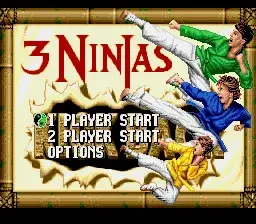
The game loads when you press Play · press “Play Now” inside the game if it asks.
3 Ninjas Kick Back
3 Ninjas Kick Back
About 3 Ninjas Kick Back
- SEGA CD
- Beat em Up
- 5· 0 votes
3 Ninjas Kick Back on SEGA CD is a title whose detailed development history is not widely documented. Like many SEGA CD games of the early to mid-1990s, it was produced during an era when developers were experimenting with blending traditional action gameplay and the CD-ROM’s capabilities for enhanced audio and video. The SEGA CD platform itself was notable for its ability to deliver full-motion video and CD-quality sound, though many games still faced challenges with loading times and hardware limitations. As such, this game fits within the broader context of mid-90s SEGA CD efforts to capitalize on the ninja-themed action craze popular at the time.
The gameplay aims to deliver a beat ’em up experience featuring the three ninja protagonists, attempting to capture the spirit of martial arts action combined with cinematic presentation. Players typically navigate side-scrolling levels, engaging in combat with enemies using a variety of attacks that suit the genre. The game tries to balance straightforward action sequences with the added audio-visual flair the SEGA CD could provide, though the actual mechanics are rooted in the conventions of beat ’em ups of that period, focusing on timing and positioning.
In retrospect, 3 Ninjas Kick Back stands as a representation of the SEGA CD’s ambitions and constraints rather than a standout classic. While it offers nostalgic value, the gameplay and presentation may feel dated compared to other titles on the platform or within the genre. The attempt to fuse licensed ninja action with the multimedia capabilities of the SEGA CD yields a product that is more of historical interest today than a must-play. It offers a glimpse into the era’s licensed game development and the challenges of delivering engaging gameplay on early CD-based consoles.
GAME INFO
- Platform
- SEGA CD
- Genre
- Beat em Up
- Publisher
- Sony Imagesoft
- Released
- 1994
- Players
- 1
- Region
- USA
How to play 3 Ninjas Kick Back online
Playing 3 Ninjas Kick Back on SEGA CD delivers a measured pace typical of beat ’em up games from the mid-90s. The tension builds as players face waves of enemies, requiring timing and strategic use of attacks. The game hooks players through its martial arts theme and the promise of controlling multiple ninja characters, though the pacing can sometimes feel uneven due to loading times inherent to the SEGA CD hardware.
The gameplay loop revolves around progressing through levels filled with enemies and obstacles, with occasional cinematic sequences that highlight the SEGA CD’s multimedia strengths. Players must manage their character’s moves carefully, combining punches, kicks, and special attacks to overcome foes. The game’s controls are designed to be accessible yet demand some precision to avoid damage from enemy attacks.
To get the most out of 3 Ninjas Kick Back, focus on mastering the timing of your attacks and learn enemy patterns early. Avoid rushing headlong into groups, as the game rewards patience and strategic movement. Utilizing the full range of moves available helps in managing tougher enemies and bosses, while keeping an eye on health and positioning can prevent quick defeats common in beat ’em ups of this era.
CONTROLS
Controls
- Arrow Keys — D-Pad / Movement
- X — A button
- S — B button
- Z — C button
- A — X button (6-button pad)
- Q — Y button (6-button pad)
- E — Z button (6-button pad)
- Enter — Start / Mode
3 Ninjas Kick Back FAQ
Is 3 Ninjas Kick Back an official release, a fan hack, a prototype, or another kind of build?
3 Ninjas Kick Back on SEGA CD is an official release. It was distributed commercially and is part of the licensed 3 Ninjas game series adapted for the SEGA CD platform.
What makes 3 Ninjas Kick Back stand out among SEGA CD titles of its era?
The game stands out primarily due to its licensed ninja theme combined with the SEGA CD’s multimedia capabilities. It integrates side-scrolling beat ’em up gameplay with cinematic elements typical of the platform’s focus on enhanced audio and video.
Is 3 Ninjas Kick Back exclusive to SEGA CD or did it appear on other systems?
This particular version of 3 Ninjas Kick Back is exclusive to the SEGA CD. Other 3 Ninjas titles appeared on different platforms, but this release was tailored specifically for the SEGA CD’s hardware and capabilities.
You may also like
All SEGA CD games



GAME INFO
- Platform
- SEGA CD
- Genre
- Beat em Up
- Publisher
- Sony Imagesoft
- Released
- 1994
- Players
- 1
- Region
- USA
COMMENTS (0)
No comments yet. Be the first to share your thoughts.