The game loads when you press Play · press “Play Now” inside the game if it asks.
Slots
Slots
Slots on PSX
- PlayStation PSX
- Simulation
- 5· 0 votes
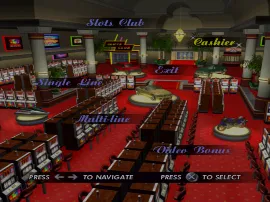
Slots is a classic casino-style game released for the PlayStation PSX. While specific details about its developer are not widely documented, it falls under the genre of simulation and was part of a wave of similar titles during the console's heyday in the mid-90s. This game reflects the era's fascination with bringing casino experiences into the home, offering players a chance to enjoy gaming without the need to visit a physical casino.
In Slots, players engage with a straightforward slot machine mechanic. The objective revolves around spinning the reels to match symbols, with the potential for payouts based on the combinations achieved. The game likely features various betting options and may include bonus rounds or special symbols that enhance gameplay, though such mechanics are common in the genre and specifics may vary.
For fans of retro gaming, Slots represents a niche but enjoyable experience, particularly for those who appreciate simulation games. While it may not have the depth or complexity of other titles on the PSX, its simplicity can be refreshing. If you're looking for a light diversion or a taste of casino gaming without the risk, this title might be worth a spin, especially for collectors of obscure or lesser-known PSX games.
GAME INFO
- Platform
- PlayStation PSX
- Genre
- Simulation
- Players
- 1
How to play Slots online
Getting started with Slots involves selecting your bet amount and then spinning the reels. As the game consists of a simple slot machine mechanic, players will be focusing on matching symbols for payouts. If you’re new to the genre, it’s useful to familiarize yourself with the paytable, which shows the winning combinations and their corresponding payouts.
The core loop of the game revolves around placing bets and spinning the reels, hoping for favorable outcomes. Understanding the basic mechanics will help you enjoy the game more. Since this title may be in Japanese, navigating the menus could require some trial and error, so pay attention to visual cues and symbols that indicate different options.
CONTROLS
Controls
- Arrow Keys — D-Pad / Movement
- X — Cross ( × )
- S — Square ( □ )
- Z — Triangle ( △ )
- A — Circle ( ○ )
- Q — L1 shoulder
- E — R1 shoulder
- Enter — Start
- V — Select
Slots FAQ
Who developed Slots?
Information regarding the developer of Slots is not widely documented, making it difficult to attribute the game to a specific studio.
Does Slots have a multiplayer or co-op mode?
Slots is primarily a single-player experience, focusing on the slot machine mechanics without any multiplayer or co-op modes available.
What makes Slots stand out among PlayStation PSX titles of its era?
The game stands out for its simplicity and focus on casino-style gameplay, a genre that was less common on the PSX compared to action or adventure titles. It offers a nostalgic experience for those who enjoy the thrill of slots without the need for complex mechanics.
You may also like
All PlayStation PSX games











GAME INFO
- Platform
- PlayStation PSX
- Genre
- Simulation
- Players
- 1
COMMENTS (0)
No comments yet. Be the first to share your thoughts.